AI Helper Guide: Study, Work, Write, and Plan with AI
An AI helper is not a magic replacement for judgment. It is a digital assistant that can draft, summarize, organize, explain, brainstorm, and turn rough material into something easier to use. The best results come when you give the tool clear context, ask for a specific output, and review the answer before you rely on it.
For students, that might mean turning lecture notes into a study plan. For professionals, it might mean converting scattered meeting notes into decisions and next steps. For creators, it might mean moving from a blank page to a structured outline. In each case, the AI helper is most useful when it reduces busywork while keeping the human responsible for accuracy, privacy, and final decisions.
A practical AI helper workflow has four parts:
- Context: provide notes, goals, constraints, and examples.
- Draft: ask the AI to produce a first version, outline, explanation, or checklist.
- Review: verify facts, tone, citations, calculations, and missing assumptions.
- Apply: move the useful output back into your real workspace, project, or study system.
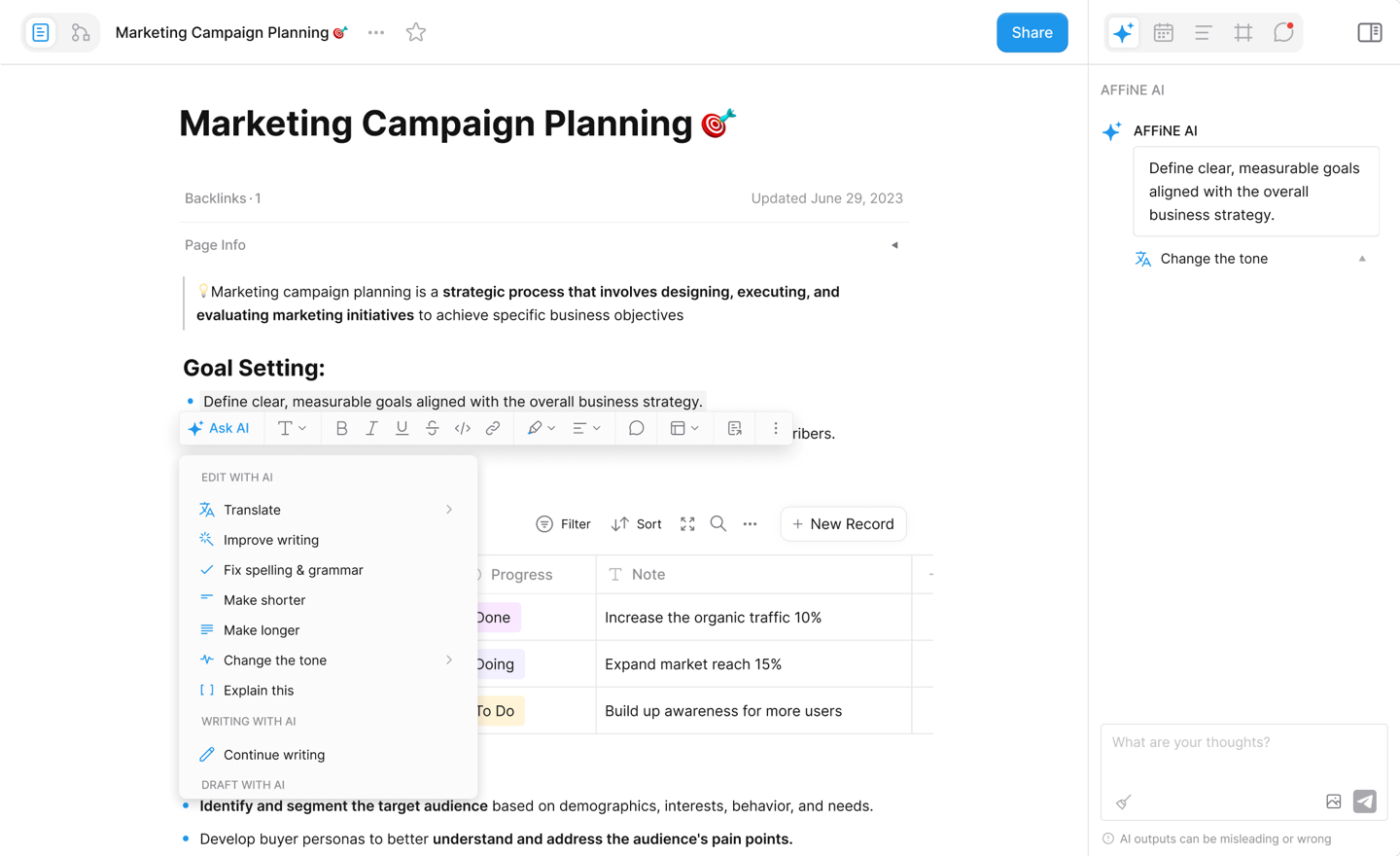
That review loop is why tools such as AFFiNE AI are useful for knowledge work. You can write, plan, map ideas, and continue refining the result in the same workspace instead of copying AI output between disconnected tabs.
What an AI Helper Actually Does
An AI helper uses artificial intelligence to assist with a task that normally requires reading, writing, reasoning, classifying, or transforming information. It may appear as a chat assistant, a document editor, a study tool, a coding assistant, a meeting summarizer, or a writing assistant embedded inside your workspace.
A good AI helper usually supports several types of work:
- Summarizing: condensing long notes, transcripts, articles, or documents into usable points.
- Explaining: breaking down a concept, equation, paragraph, or process in simpler language.
- Structuring: turning raw notes into outlines, tables, briefs, tasks, or study plans.
- Drafting: producing a first version of an email, essay outline, project brief, script, or checklist.
- Brainstorming: generating alternatives, questions, examples, or angles when you are stuck.
- Transforming: changing tone, format, reading level, language, or presentation style.
The important distinction is that an AI helper assists the workflow. It should not silently become the workflow. If a task affects grades, customers, hiring, legal decisions, medical decisions, finances, security, or public claims, the AI output needs human review and, when appropriate, expert review.
The National Institute of Standards and Technology AI Risk Management Framework frames AI risk management around governance, mapping, measuring, and managing AI risks. That is a useful way to think about everyday AI helpers too: know where you are using AI, know what could go wrong, check the output, and set a clear boundary for final decisions.
Everyday Tasks: Turn Loose Notes into Action
The easiest place to start with an AI helper is not a high-stakes task. Start with the repetitive work that slows you down but still benefits from review.
For example, you can ask an AI helper to:
- turn a messy note into a clean task list;
- summarize a meeting into decisions, owners, and deadlines;
- rewrite a long message into a shorter update;
- create a project outline from a goal and constraints;
- compare options in a table;
- draft questions before a meeting;
- identify what information is missing from a plan.
The quality of the result depends heavily on the prompt. A weak prompt says, "help me plan this." A stronger prompt says, "Create a one-week project plan for launching a beta feature. Include tasks, owners, risks, and what I should confirm before starting. Keep the plan realistic for a two-person team."
A simple prompt formula works well:
Role + context + desired output + constraints + review request
Example:
"Act as a project assistant. I am preparing a research sprint for a small product team. Turn these notes into a 5-day plan with daily goals, owner roles, and open questions. Flag assumptions you cannot verify."
That last sentence matters. Asking the AI to flag assumptions makes the output easier to review and reduces the chance that a confident-looking answer hides missing context.
Study and Homework: Learn the Method, Not Just the Answer
Students often search for an AI homework helper because they want faster help with assignments. The most useful and defensible use is not "give me the answer." It is "help me understand the method so I can solve the next one."
For study work, an AI helper can support:
- turning lecture notes into a quiz;
- explaining a concept at a simpler level;
- making flashcards from a reading;
- comparing two theories in a table;
- outlining an essay before drafting;
- identifying weak areas before an exam;
- creating a study schedule from a deadline.
If you use an AI homework helper, ask it to show the reasoning and then test yourself without the answer visible. For math, request step-by-step explanation and then try a similar problem. For writing, ask for feedback on structure, clarity, and evidence rather than asking it to submit a finished essay for you.
UNESCO's Guidance for generative AI in education and research emphasizes a human-centered approach to educational AI. That principle is practical for students: use AI to get unstuck, check your understanding, and organize practice, but do not outsource the learning itself.
A safer student prompt looks like this:
"Explain this problem step by step, then give me a similar practice problem without solving it. After I answer, check my reasoning and point out the first mistake."
That pattern keeps the AI helper in the role of tutor, not ghostwriter.
Writing and Research: Build a Draft You Can Defend
AI writing helpers are useful when you already know the goal but need help with structure, wording, or momentum. They are weaker when asked to invent facts, sources, or expert judgment.
Use AI for writing tasks such as:
- turning bullet notes into a first draft;
- producing three outline options;
- tightening a long paragraph;
- changing tone for a specific audience;
- finding unclear claims;
- creating a checklist for revision;
- generating questions a reader might ask.
Avoid using AI as the sole source for factual claims. If the article, report, or proposal includes statistics, quotes, product details, legal claims, financial claims, health claims, or technical claims, verify them against primary sources before publishing.
A good research workflow is:
- Collect source notes yourself.
- Ask the AI helper to organize the notes by theme.
- Ask it to identify gaps and contradictions.
- Write or revise the draft with source links visible.
- Check every factual claim before finalizing.
AFFiNE is well suited to this style because the source notes, outline, whiteboard, and draft can live together. That makes the review trail easier to follow than a standalone chat transcript.
Visual Thinking: Turn Ideas into Maps and Presentations
Some work is easier to understand visually. A plain list may hide relationships between ideas, while a mind map, flowchart, or presentation board can make gaps obvious.
An AI helper can assist visual thinking by:
- turning a document into a mind map;
- creating an outline from a brainstorming board;
- suggesting sections for a presentation;
- grouping ideas into themes;
- showing dependencies between tasks;
- converting a research summary into slide structure.
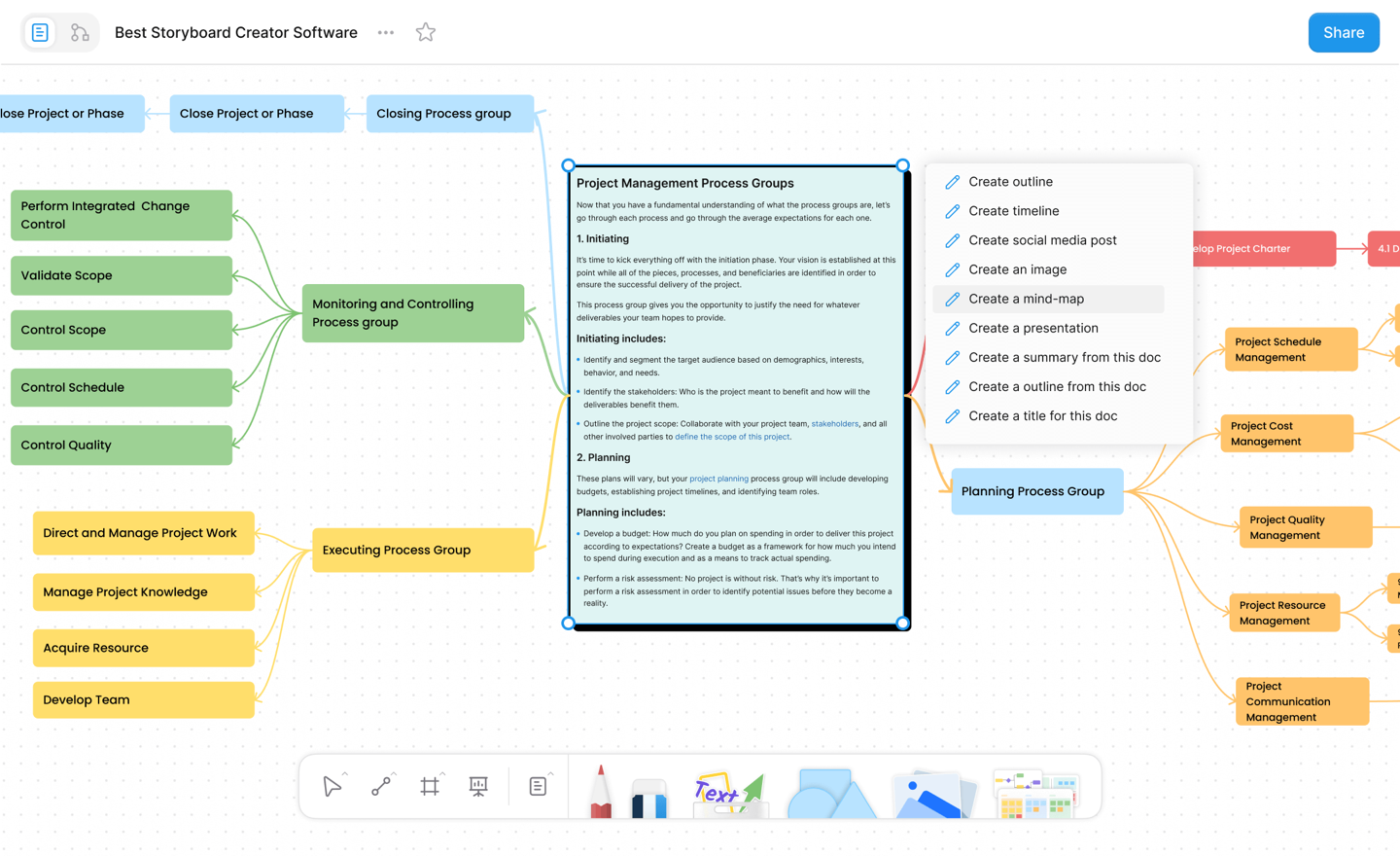
Visual outputs still need editing. AI may group items in a way that looks tidy but misses the real priority. Treat the first map or slide outline as a thinking surface. Move nodes, rename groups, remove weak points, and add missing context.
This is especially useful for project planning, research papers, product specs, workshop planning, and team retrospectives. The AI helper gives you a starting structure; the human team decides what the structure actually means.
Coding and Technical Work: Use AI as a Pair, Not an Autopilot
An AI coding helper can explain unfamiliar code, suggest test cases, generate examples, and help debug. It can also produce code that looks plausible but fails edge cases or violates local project conventions.
Use AI coding assistance for:
- explaining a function or error message;
- drafting a small utility;
- suggesting test cases;
- comparing implementation approaches;
- writing documentation for code you understand;
- spotting likely edge cases;
- translating a concept between languages.
Do not merge AI-generated code just because it compiles once. Run the project tests, inspect security implications, check dependencies, and confirm that the code follows the existing architecture.
A stronger coding prompt is:
"Given this function and the surrounding tests, suggest the smallest fix. Explain the risk, add a regression test, and avoid changing public behavior outside this bug."
That prompt gives the AI a narrow job and asks it to reason about blast radius. It also makes the output easier for a developer to review.
Career and Professional Development: Prepare Better, Stay Honest
AI helpers can support professional development, but the goal should be preparation, not fabrication. They can help you understand a job description, map your experience to requirements, practice interview answers, or rewrite a resume bullet for clarity.
Useful career prompts include:
- "Compare this job description with my resume and list the strongest matches."
- "Turn this project into three resume bullets, but do not invent numbers."
- "Ask me five interview questions for this role and grade my answer for clarity."
- "Identify which skills I should learn next for this career path."
The phrase "do not invent" is important. AI helpers may otherwise add metrics, tools, or responsibilities that sound professional but are not true. That is a trust problem. Keep final career materials grounded in work you can explain.
How to Choose an AI Helper
The best AI helper is the one that fits your actual workflow. A powerful chat model is less useful if every answer has to be copied into another app and reformatted by hand.
Use this checklist before choosing a tool:
| Question | Why it matters |
|---|---|
| What task do I repeat every week? | Start with a real workflow, not a vague promise. |
| Can I provide enough context? | AI works better with notes, examples, goals, and constraints. |
| Can I review the output quickly? | If review takes longer than doing the task, the tool is not helping. |
| Does it fit my workspace? | The output should land where you actually write, plan, or study. |
| How does it handle privacy? | Avoid pasting sensitive data into tools you do not trust. |
| Can I trace sources and decisions? | Important work needs a review trail. |
AFFiNE AI is strongest when the AI helper needs to sit next to documents, whiteboards, plans, and project notes. If your workflow is mostly knowledge work, that context matters.
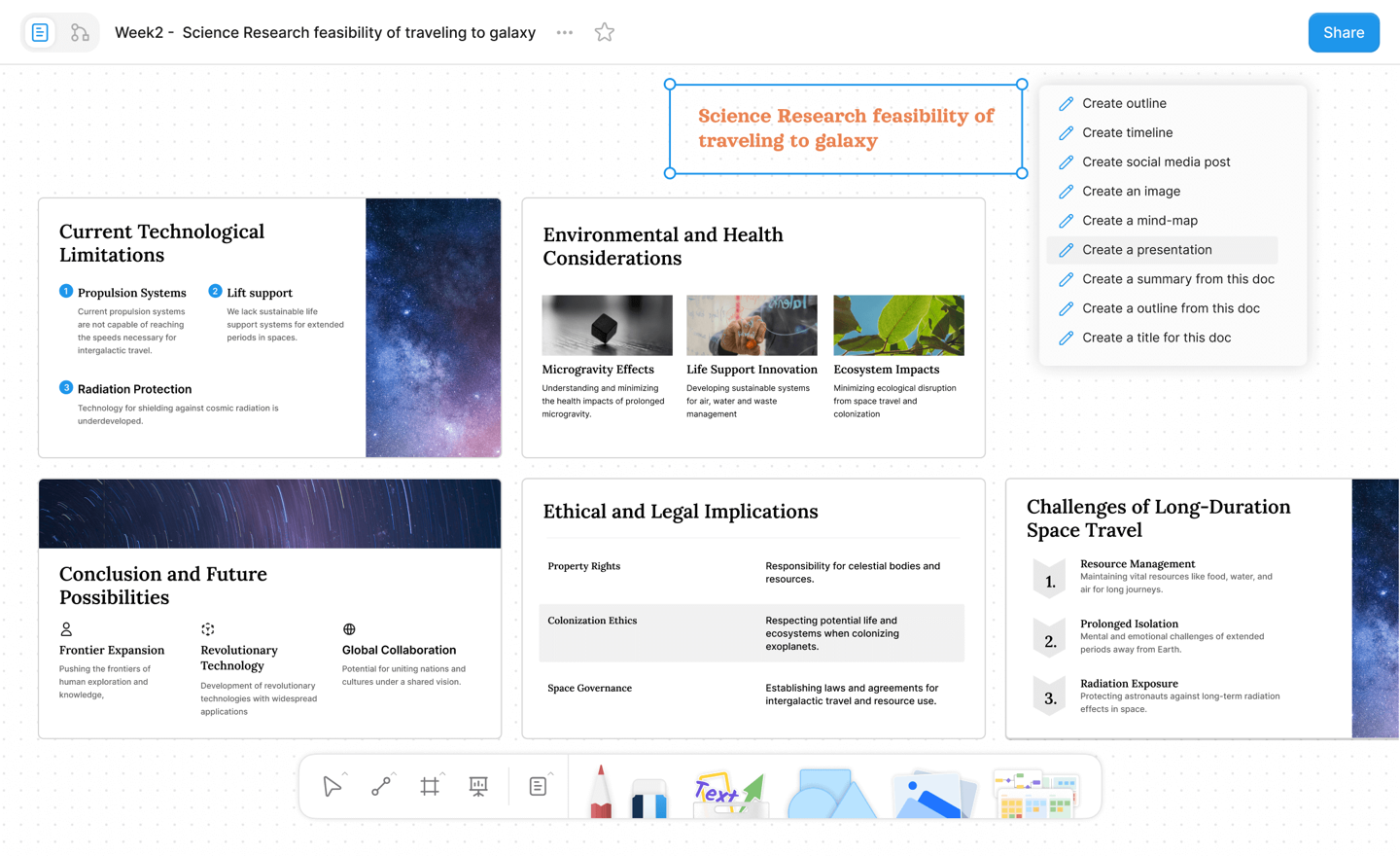
A Practical AI Helper Workflow in AFFiNE
Here is a simple workflow you can use for study, work, or personal projects:
- Collect context. Add notes, links, meeting points, research snippets, or rough ideas into one AFFiNE workspace.
- Ask for structure. Use AFFiNE AI to turn the material into an outline, plan, comparison table, or mind map.
- Review weak spots. Ask what assumptions are missing, what claims need verification, and what the reader may not understand.
- Rewrite with intent. Improve tone, clarity, and length for the target audience.
- Move to action. Convert the final output into tasks, a presentation, a study checklist, or a project brief.
- Keep the trail. Preserve the source notes and revised output together so you can explain where the answer came from.
This is the difference between using AI as a shortcut and using AI as a thinking partner. The shortcut may save a few minutes. The workflow can improve the quality of the work.
Common Mistakes to Avoid
Using AI without context. The less context you give, the more generic the answer becomes. Include goals, audience, constraints, and examples.
Accepting confident claims. AI helpers can sound certain even when they are wrong. Verify facts, links, numbers, citations, and product details.
Skipping privacy review. Do not paste confidential customer data, employee data, source code, financial records, medical information, or legal documents into a tool unless your organization has approved that use.
Letting AI flatten your voice. AI can make writing smoother, but it can also make everything sound generic. Keep the examples, judgment, and details that make the work yours.
Measuring output instead of outcome. A longer draft is not necessarily better. The useful question is whether the AI helped you understand, decide, create, or act faster with the same or better quality.
Conclusion
An AI helper is most valuable when it handles the first pass and leaves you in charge of the final answer. It can summarize notes, explain difficult concepts, draft outlines, build visual maps, suggest code tests, and prepare professional materials. But it still needs human review.
For students, that means using AI to learn the method. For professionals, it means turning scattered information into decisions and action. For creators, it means getting past the blank page while preserving human taste and intent.
The strongest AI helper workflow is simple: gather context, ask for a specific output, review the result, and apply it in your real workspace. If you want that process inside a connected writing and whiteboard environment, AFFiNE AI gives you a practical place to start.
Frequently Asked Questions About AI Helpers
What is an AI helper?
An AI helper is a digital assistant that uses artificial intelligence to support tasks such as summarizing, explaining, drafting, organizing, brainstorming, coding, or planning. It is best used as an assistant that speeds up the first pass while a person checks the final output.
Can I use an AI helper online for free?
Yes. Many AI helper tools offer a free plan or free trial, although limits vary by product. Before using a free AI helper for serious work, check its privacy policy, export options, usage limits, and whether the output can be reviewed or cited.
Is an AI homework helper safe to use?
It depends on how you use it. It is safer to ask for explanations, practice questions, outlines, and feedback than to submit AI-written answers as your own work. Follow your school policy and use AI to understand the material, not to bypass the assignment.
How can AI helpers improve productivity?
AI helpers improve productivity by reducing repetitive setup work: summarizing notes, turning rough ideas into structure, drafting first versions, creating checklists, and highlighting missing information. The time savings are strongest when the task has clear context and a human review step.
What should I check before trusting AI output?
Check factual claims, source links, calculations, dates, names, tone, privacy risks, and missing assumptions. If the output affects customers, grades, hiring, finances, security, legal matters, or health decisions, get a qualified human review before using it.
Where does AFFiNE AI fit?
AFFiNE AI fits when your AI helper needs to work inside a broader knowledge workspace. You can keep notes, documents, whiteboards, plans, outlines, and AI-generated drafts together, which makes review and follow-through easier than working from a separate chat window.