Excalidraw Alternatives: 5 Tools Compared for 2026
Quick answer: the best Excalidraw alternative depends on your workflow
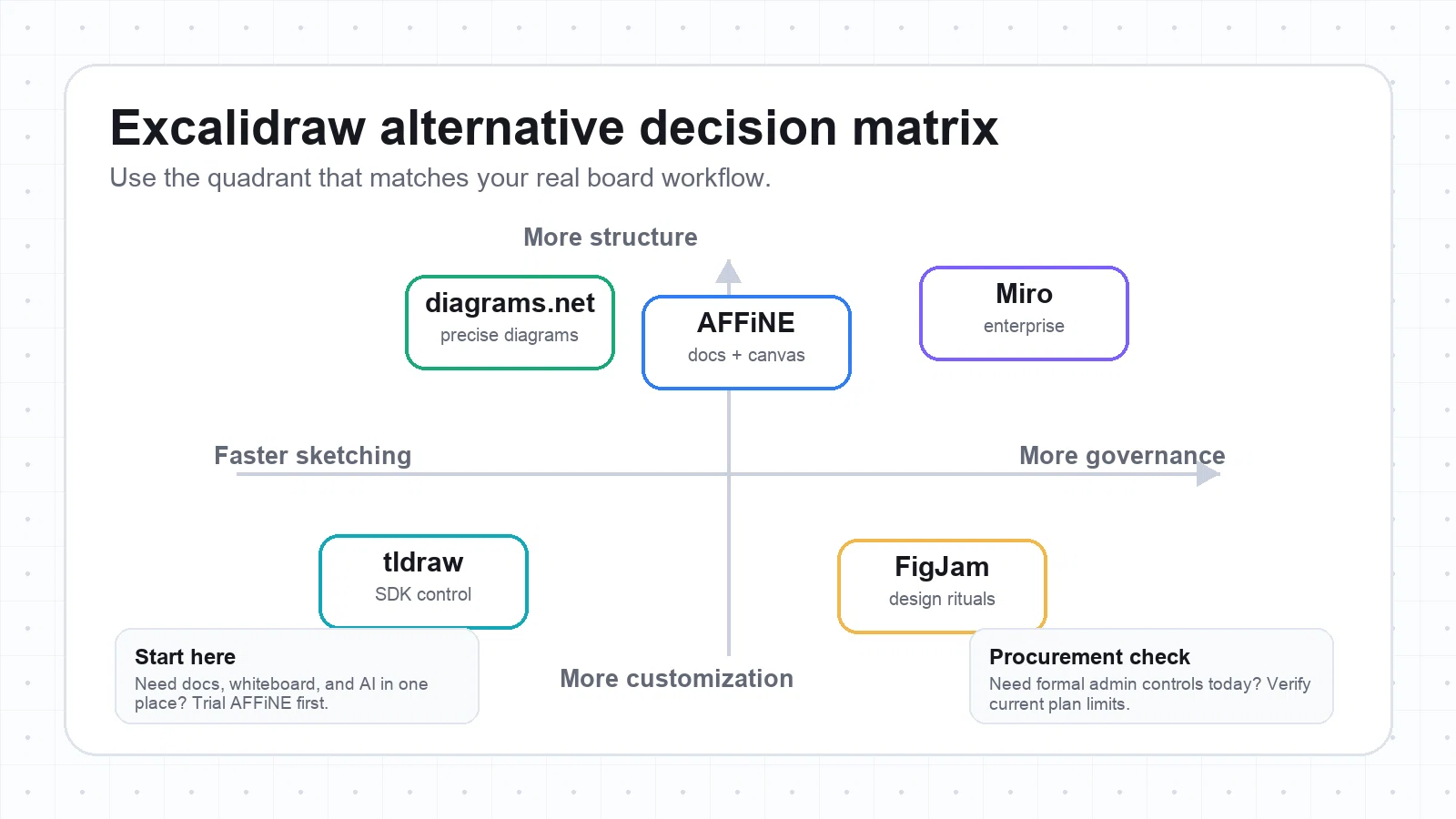
If you like Excalidraw because it is fast, visual, and low-friction, do not replace it with the tool that has the longest feature list. Replace it with the tool that fits the work that happens after the sketch.
For most teams comparing Excalidraw alternatives in 2026, the shortlist is simple:
| Need | Best fit | Why |
|---|---|---|
| Whiteboard plus docs, notes, AI, and local-first work | AFFiNE | Combines an infinite canvas with structured pages, databases, and AI in one workspace. |
| Developer-friendly canvas or embedded drawing UI | tldraw | Strong SDK, open-source canvas primitives, and flexible export paths. |
| Enterprise workshops and large-group facilitation | Miro | Mature templates, voting, timers, guest flows, integrations, and enterprise controls. |
| Design-team ideation tied to Figma | FigJam | Lightweight workshops, stickers, comments, and a direct handoff into Figma design work. |
| Precise technical diagrams and offline file control | diagrams.net | Strong shape libraries, desktop app, self-contained files, and SVG/PNG/PDF export. |
Updated June 27, 2026: this guide was refreshed with new self-hosted images, descriptive alt text, a clearer evaluation method, and current official-source checks for the main tools.
How we evaluated these Excalidraw alternatives
This article is written for product teams, educators, designers, founders, and technical teams who already understand why Excalidraw is appealing: it is quick, familiar, and good for rough diagrams. The harder question is what happens when the sketch becomes a workshop, a specification, a project plan, or a compliance-sensitive artifact.
We evaluated each tool against practical switching criteria:
- Sketching speed: how quickly a user can start drawing and explaining an idea.
- Collaboration: real-time cursors, guest access, comments, facilitation tools, and handoff quality.
- Structure: whether the board can become a document, process map, knowledge base, or long-lived diagram.
- Export and portability: support for SVG, PNG, PDF, file-based work, and documentation workflows.
- Offline, local, or self-hosted control: important for privacy, classrooms, regulated teams, and developer embedding.
- Governance: SSO, audit logs, permission models, retention, and admin controls where relevant.
- Learning curve: whether the tool works for non-technical teammates without long onboarding.
Feature data was checked against official product pages, documentation, help centers, and pricing/security pages where available. Vendor plans change often, so treat the tables below as a decision framework, then verify the exact pricing, admin, and export limits before rollout.
What Excalidraw is still best at
Excalidraw remains excellent for quick visual thinking. It is especially strong when you need to explain an architecture idea, sketch a UI concept, make a rough flowchart, or collaborate in a browser without turning the board into a formal project system.
Keep Excalidraw when:
- The board is temporary and does not need long-term ownership.
- A rough hand-drawn style is a feature, not a limitation.
- You need a simple drawing space with minimal onboarding.
- You do not need deep templates, workflow integrations, or enterprise controls.
Switch when the board needs to become something durable: a spec, workshop artifact, process diagram, documentation asset, or knowledge base. That is where the alternatives below start to separate.
1. AFFiNE: best for turning whiteboards into docs and plans
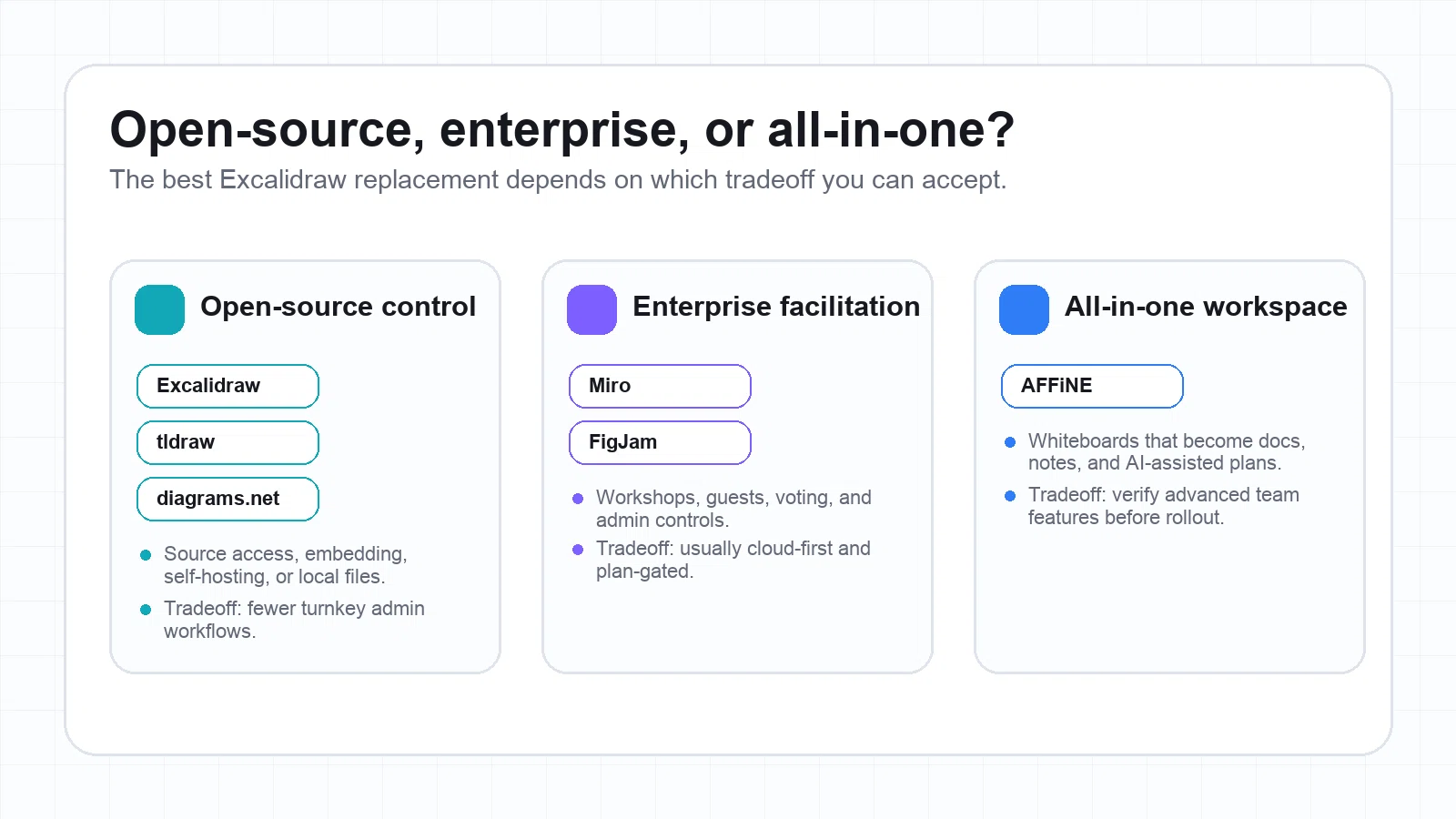
AFFiNE is the best Excalidraw alternative when a board should not stay isolated. It combines docs, whiteboards, databases, and AI in a local-first workspace, so a rough sketch can live beside notes, project context, and follow-up tasks.
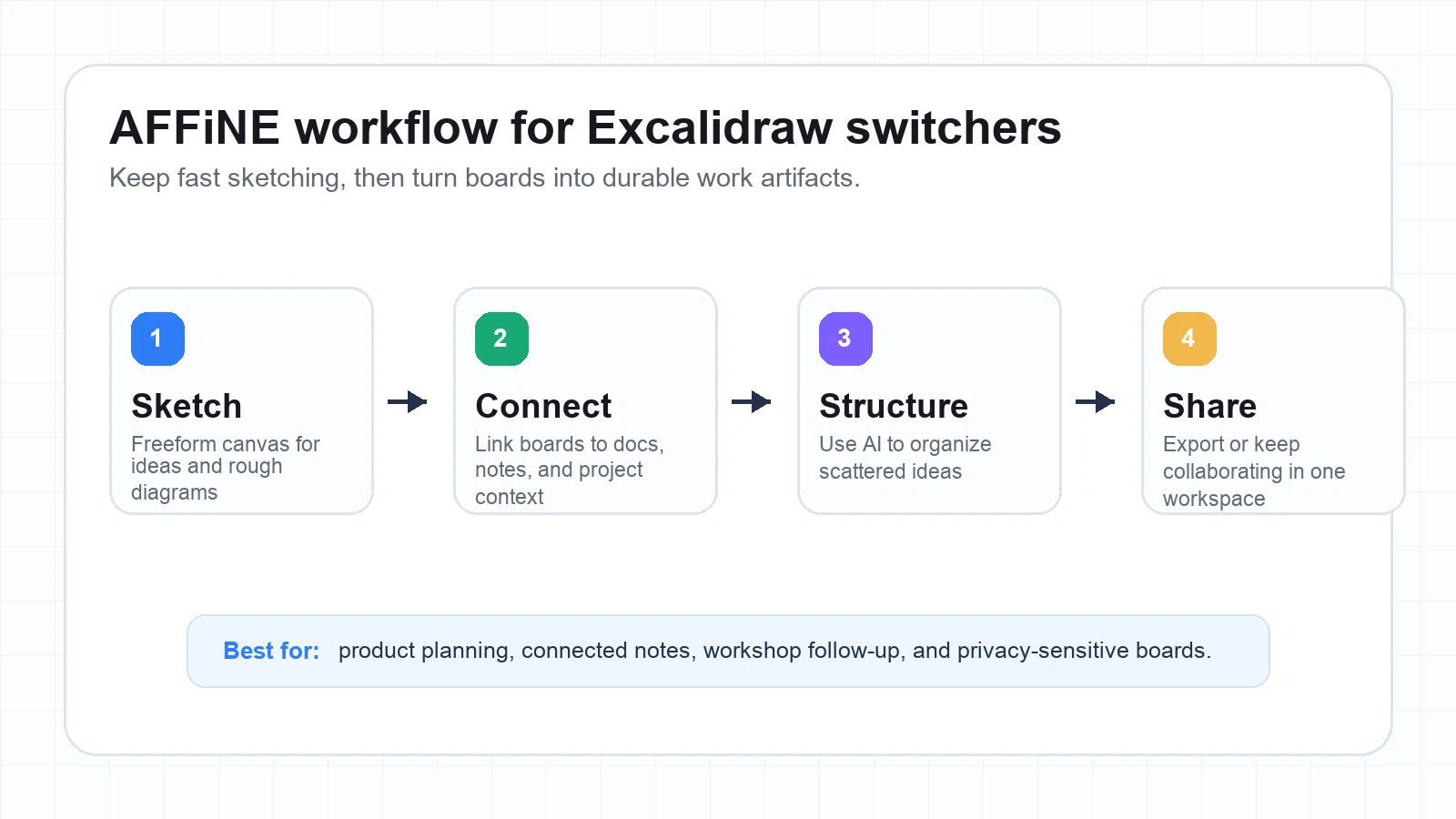
That matters because many teams do not fail at drawing. They fail at turning the drawing into the next step. A product team sketches a user journey, then needs the same work to become a meeting note, roadmap, decision log, and follow-up checklist. AFFiNE is designed for that connected workflow.
AFFiNE strengths
- Infinite canvas plus structured pages, so you can switch between whiteboard thinking and document writing.
- Local-first workspace design for users who care about data ownership and offline-friendly work.
- AI-assisted mind mapping and note organization for turning messy ideas into a cleaner structure.
- Templates for planning, workshops, notes, and project artifacts.
- Good fit for personal knowledge management, product planning, research, and team documentation.
AFFiNE limitations
- If your only need is a one-off sketch, AFFiNE may be more workspace than you need.
- Teams with strict procurement requirements should verify current workspace admin, self-hosting, and compliance needs before standardizing on it.
- Some third-party integrations may be less mature than long-established enterprise whiteboards.
Choose AFFiNE if
Choose AFFiNE if your Excalidraw board usually becomes a document, meeting note, research map, strategy canvas, or project plan. It is strongest when visual thinking and written knowledge need to stay connected.
2. tldraw: best for developers and embedded canvases
tldraw is a strong alternative for developers, technical teams, and product builders who want a fast canvas that can be embedded, customized, or extended. The tldraw SDK documentation is developer-first, and its image export docs cover SVG and raster exports.
This makes tldraw less of a classic enterprise whiteboard and more of a canvas foundation. If you are building a product feature, internal tool, design sandbox, or custom drawing experience, that matters.
tldraw strengths
- Fast, minimal drawing experience with a low-friction feel similar to Excalidraw.
- Strong developer story through SDK installation and customization.
- Good export pipeline for SVG and raster formats.
- Useful for internal tools, technical interviews, live coding, and embedded whiteboards.
- Open-source ecosystem and clear GitHub presence.
tldraw limitations
- Non-technical teams may not benefit from the SDK advantages.
- Enterprise governance, templates, and facilitation features are not the main reason to choose it.
- For self-hosted or embedded production use, budget time for engineering setup and maintenance.
Choose tldraw if
Choose tldraw if your team wants a clean canvas that developers can shape. It is a practical fit for teams comparing Excalidraw vs tldraw because they care about customization, not just a hosted whiteboard app.
3. Miro: best for enterprise workshops and cross-functional teams
Miro is the mature enterprise option. It is a better Excalidraw alternative when you need structured workshops, facilitation controls, many templates, guest collaboration, and integrations with the broader enterprise stack. Miro also publishes enterprise security features such as SSO, audit logs, and advanced user management on its feature and help pages.
Miro strengths
- Strong workshop toolkit: timers, voting, presentation flows, frames, and large template libraries.
- Mature integrations with tools such as Jira, Slack, Confluence, and other workplace systems.
- Enterprise controls for organizations that need SSO, audit logs, permissions, and security review.
- Familiar collaboration model for large distributed teams.
- Good for design sprints, retrospectives, planning sessions, and stakeholder workshops.
Miro limitations
- Can feel heavy if you only need quick sketching.
- Costs and feature access depend heavily on plan tier, so procurement should check current pricing.
- Cloud-first collaboration may not fit teams that require local-first or file-based workflows.
Choose Miro if
Choose Miro if your team runs workshops with many participants and needs facilitation plus governance more than lightweight drawing. It is the safer enterprise default, but not always the fastest sketching tool.
4. FigJam: best for design teams already using Figma
FigJam is strongest when whiteboarding is part of a design workflow. It is ideal for critiques, ideation, retrospectives, early user flows, and workshops that eventually move into Figma files. Figma's help center documents FigJam export options such as PNG, JPG, PDF, and CSV for sticky notes and tables.
FigJam strengths
- Very easy for design teams already using Figma.
- Good for sticky-note workshops, mapping, comments, reactions, and early design collaboration.
- Open sessions and guest-friendly workflows can reduce workshop friction.
- Strong handoff into Figma design work.
- Useful when the output is a design conversation, not a formal architecture diagram.
FigJam limitations
- Not the deepest technical diagramming tool.
- Offline and local-first workflows are not the main use case.
- Export and admin needs should be checked against the current Figma/FigJam plan.
Choose FigJam if
Choose FigJam if your team already lives in Figma and needs a playful collaboration layer for early thinking. It is less compelling if your main work is engineering diagrams, local files, or compliance-heavy planning.
5. diagrams.net: best for precise diagrams and offline file control
diagrams.net, also known as draw.io, is the best fit when your Excalidraw replacement needs precision. It is not trying to be a playful sticky-note workshop tool. It is for flowcharts, network diagrams, architecture maps, UML-style diagrams, and documentation assets that need to stay editable and portable.
The official draw.io site highlights export to SVG, PNG, and PDF, and the desktop repository documents an offline desktop app for teams that need local control.
diagrams.net strengths
- Strong shape libraries for technical diagrams, flowcharts, architecture maps, and process documentation.
- Good export and embedding options, especially for documentation workflows.
- Desktop app and file-based work suit offline or controlled environments.
- Works well when diagrams need versioning, review, or storage in a file system.
- Free and familiar to many engineering and operations teams.
diagrams.net limitations
- Real-time workshop facilitation is not its main strength.
- The interface is more technical and less playful than Excalidraw, FigJam, or Miro.
- Collaboration often depends on file storage or platform integrations rather than a native workshop flow.
Choose diagrams.net if
Choose diagrams.net if your diagrams need precision, editability, and documentation discipline. It is especially useful for engineering teams that care more about exported diagrams and source files than live workshop energy.
Side-by-side comparison
| Tool | Best for | Real-time collaboration | Export | Offline/local control | Governance | Learning curve |
|---|---|---|---|---|---|---|
| AFFiNE | Docs, whiteboard, AI, knowledge work | Yes | Common visual/document workflows | Local-first workspace | Verify current team/admin needs | Moderate |
| tldraw | Developer canvas and embedding | Yes, depending on setup | SVG and raster export | Strong if self-hosted or embedded | Requires engineering setup | Low for users, higher for builders |
| Miro | Enterprise workshops | Strong | PNG/PDF and board export options by plan | Limited compared with local-first tools | Strong enterprise controls by plan | Moderate |
| FigJam | Design-led workshops | Strong | PNG/JPG/PDF and CSV for some content | Cloud-first | Depends on Figma plan | Low |
| diagrams.net | Technical diagrams | Limited or integration-dependent | SVG/PNG/PDF | Strong desktop and file workflows | File/process-based | Moderate |
How to migrate from Excalidraw without losing fidelity
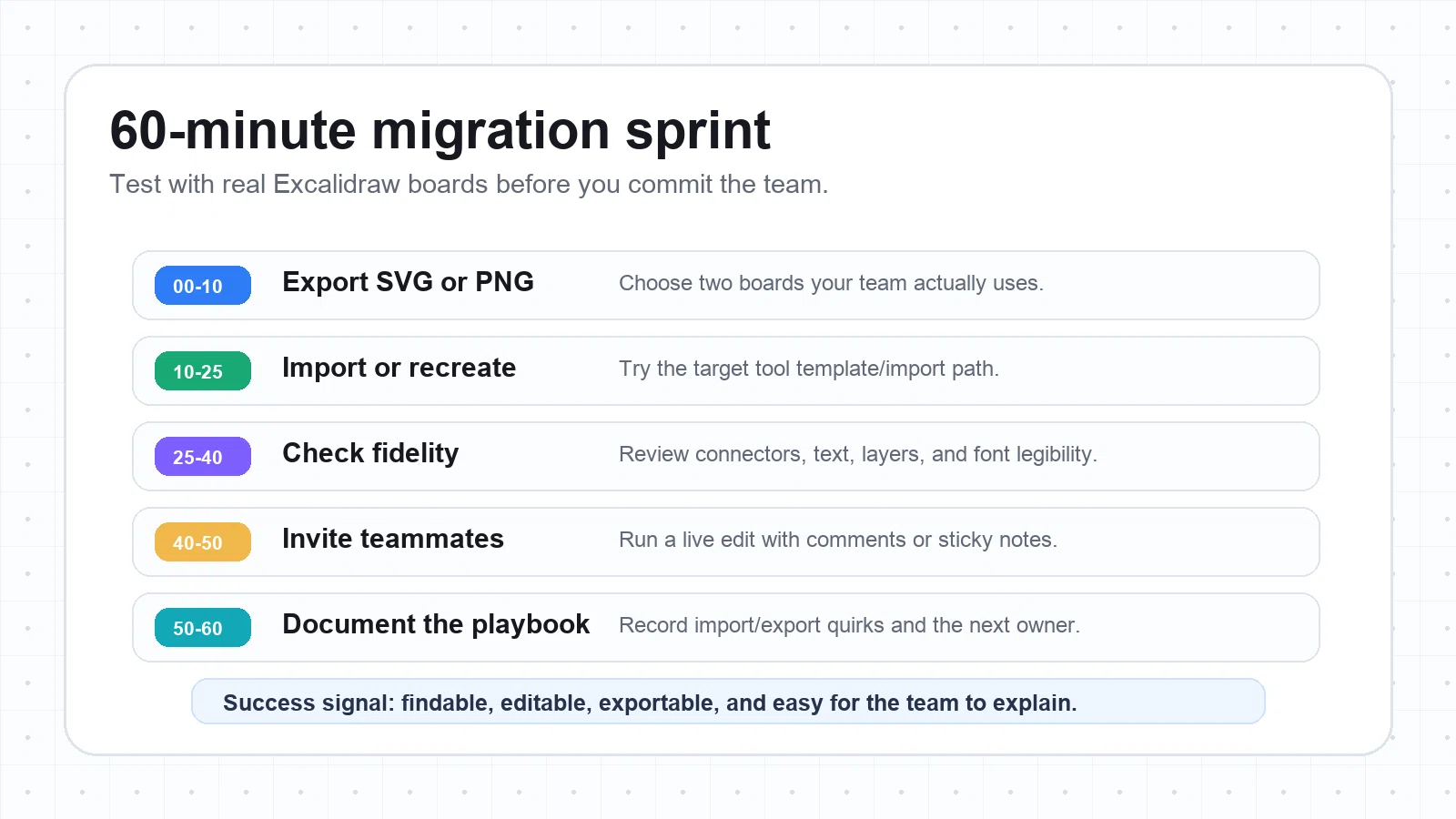
Do not migrate your whole workspace first. Run a 60-minute test with two boards: one simple board and one messy board that contains arrows, text, icons, and grouped objects. That will expose the real switching cost.
Use this migration process:
- Export your Excalidraw boards as SVG and PNG.
- Import or recreate the board in your chosen alternative.
- Check connectors, text wrapping, font legibility, grouping, and layers.
- Invite two teammates and run a real collaboration test.
- Export the final result and place it in the documentation system where it will actually be used.
- Write down what broke, what needed redrawing, and who owns the new workflow.
If the imported board is only readable as an image, treat it as a reference and recreate the important shapes. Editable diagrams are more valuable than pixel-perfect screenshots.
Final recommendation
Pick AFFiNE if you want the best balance of whiteboard, document, AI, and local-first workspace. It is the strongest choice when sketches need to become durable knowledge.
Pick tldraw if you want a developer-friendly canvas that can be customized, embedded, or self-hosted with engineering effort.
Pick Miro if your main need is enterprise facilitation, procurement readiness, and large-team workshop operations.
Pick FigJam if your team already works in Figma and wants a fast, design-friendly ideation space.
Pick diagrams.net if you need precise technical diagrams, offline files, and clean exports for documentation.
The best Excalidraw alternative is not the one that copies Excalidraw most closely. It is the one that supports the next step after the sketch.
Frequently asked questions
What is the best free Excalidraw alternative?
The best free option depends on the job. AFFiNE is strong if you want an all-in-one workspace with whiteboard and docs. tldraw is strong for lightweight drawing and developer customization. diagrams.net is strong for precise technical diagrams and offline files. Always confirm current free-plan limits before choosing a tool for a team.
Which Excalidraw alternative is best for product teams?
AFFiNE is the best fit when product work includes whiteboards, notes, project docs, AI-assisted structure, and planning artifacts. Miro is better when the product team runs large workshops with many stakeholders. FigJam is better when the product workflow is tightly connected to Figma design files.
Which Excalidraw alternative is best for developers?
tldraw is the strongest developer-oriented option because its SDK is designed for custom canvas apps and embedded whiteboard experiences. diagrams.net is also strong for engineering documentation when precision and file-based diagrams matter more than embedding a canvas in a product.
Can I import Excalidraw files into these tools?
Usually you should start by exporting from Excalidraw as SVG or PNG, then importing or recreating the board in the new tool. The result may be readable but not fully editable. For important process maps, architecture diagrams, or long-lived docs, redraw the key shapes in the destination tool so the board remains maintainable.
Is Miro better than Excalidraw?
Miro is better for large workshops, templates, facilitation, integrations, and enterprise controls. Excalidraw is better for fast informal sketching. If your team needs governance and repeatable workshop operations, Miro is stronger. If you need a quick rough diagram, Excalidraw may still be faster.
Is AFFiNE a good Excalidraw alternative?
Yes, especially when you want a whiteboard that connects to docs, notes, databases, and AI-assisted planning. AFFiNE is less about copying Excalidraw's hand-drawn style and more about helping visual ideas become durable work.