Free Activity Diagram Template for UML Workflows (2026)
Free UML activity diagram template for 2026. Model workflows, decisions, swimlanes, and parallel branches in minutes. Editable online with AFFiNE, no signup.
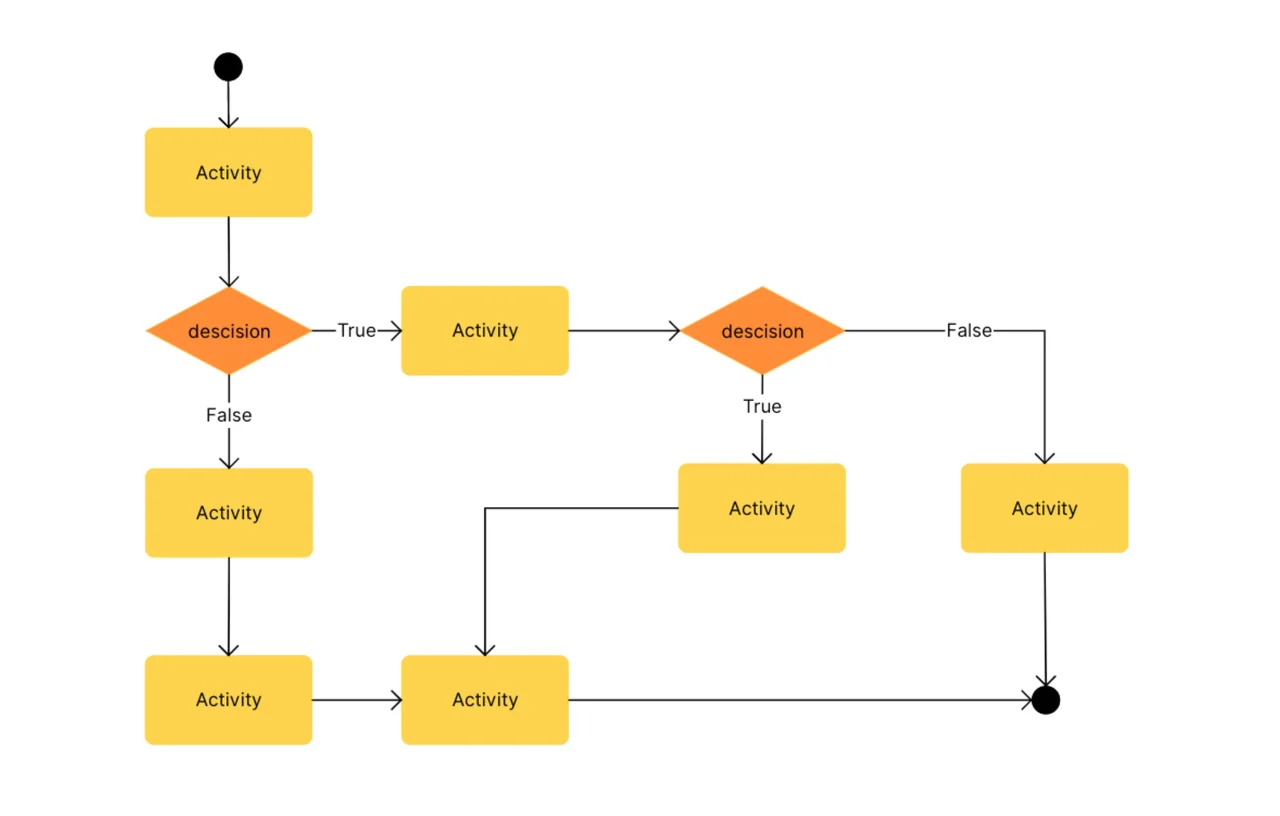
A UML activity diagram is a behavioral diagram in the Unified Modeling Language that models the dynamic flow of a process — the sequence of actions, decisions, parallel branches, and end states that move work from start to finish. Where a use case diagram answers "what should this system do, and for whom?", an activity diagram answers "how does the work actually flow?" This free template, built in AFFiNE's edgeless whiteboard, ships with the standard UML 2.5 activity notation in an editable canvas — no signup, no export limits.
Last updated June 2026 · Compatible with UML 2.5 specification · Built on open-source AFFiNE (50K+ GitHub stars)
Reach for an activity diagram when you are:
Skip it when you only need to capture who uses the system (use a use case diagram instead) or when the conversation is purely about message timing between objects (use a sequence diagram).
This template ships with the seven core elements of the UML 2.5 activity notation:
| Element | Symbol | Purpose |
|---|---|---|
| Initial node | Filled black circle | Marks where the flow begins |
| Activity / Action | Rounded rectangle | A single unit of work in the process |
| Decision | Diamond (single in, multiple out) | A branch with guard conditions |
| Merge | Diamond (multiple in, single out) | Joins alternate paths back together |
| Fork / Join | Thick horizontal bar | Splits flow into parallel branches (fork) or synchronizes them (join) |
| Swimlane | Vertical or horizontal partition | Assigns responsibility for an action to a role or system |
| Final node | Bullseye (filled circle inside open circle) | Marks where the flow ends |
The Object Management Group's UML 2.5 specification is the canonical source for notation rules; this template follows that spec.
"An activity is the specification of parameterized Behavior as the coordinated sequencing of subordinate units whose individual elements are actions." — OMG Unified Modeling Language Specification, v2.5.1
On the swimlane construct used in this template, the same spec states:
"An ActivityPartition is a kind of ActivityGroup for identifying actions that have some characteristic in common." — OMG Unified Modeling Language Specification, v2.5.1
Most teams produce a useful first-pass activity diagram in 20-40 minutes once the process boundaries and primary decision points are agreed on. Follow these five steps:
Identify the start and end points. Drop an initial node where work begins and one or more final nodes where it ends. The diagram is the contract between trigger and outcome — be explicit about both before adding any middle.
List the actions in sequence. Walk through the happy-path: every distinct unit of work becomes a rounded rectangle. Aim for 8-20 actions per diagram; if you exceed 25, split the model into sub-activities. IBM's requirements modeling guidance treats this ceiling as a readability threshold.
Add decision points and merges. Wherever the flow branches on a condition, drop a diamond and label each outgoing arrow with the guard condition in square brackets (for example, [approved], [rejected]). Always pair every decision with a merge — unmerged branches are the #1 source of diagram bugs.
Insert parallel branches with fork and join bars. When two or more actions can happen concurrently (such as "Notify customer" and "Update CRM" after an order completes), use a fork bar to split the flow and a join bar to synchronize. Keep fork/join pairs balanced — every fork needs a matching join.
Partition with swimlanes when ownership matters. Add vertical lanes labeled by role, team, or system. Drag each action into the lane responsible for it. Swimlanes turn a process diagram into an accountability diagram and are the single highest-leverage clarity upgrade for cross-team workflows.
After step 5, switch to AFFiNE's page mode to capture the action descriptions, owners, and SLAs alongside the diagram in one document — page and edgeless live in the same file.
| Diagram type | Best for | When to choose this instead |
|---|---|---|
| Activity diagram | "How" — workflow, decisions, parallelism | You need to model a multi-step process or business flow |
| Use case diagram | "What" — functional scope + actors | You need to align stakeholders on system boundaries |
| Sequence diagram | Time-ordered messages between objects | You need message-level detail for one scenario |
| State diagram | An object's lifecycle of states + transitions | You're modeling a single entity's behavior over time |
| Communication diagram | Object collaborations and links | You care about structure of interactions, not workflow steps |
| BPMN diagram | Business-process notation with full BPMN palette | The audience expects BPMN compliance |
For end-to-end coverage of the UML 2.5 family, browse the full diagram template library. For data-flow modeling that complements process modeling, see the data flow diagram guide.
A UML activity diagram is a behavioral diagram defined by the UML 2.5 specification that models the dynamic flow of a process as a sequence of actions, decisions, parallel branches, and end states. It is the standard UML diagram for visualizing workflows, business processes, and software algorithms with conditional and concurrent behavior.
A flowchart is an informal symbol set with no governing standard; an activity diagram follows the formal UML 2.5 notation, with specific shapes (rounded rectangles for actions, diamonds for decisions, bars for parallelism, partitions for ownership) and guard-condition labels on branches. Activity diagrams are the right choice when the audience expects a precise, reviewable model rather than a sketch.
The seven core elements are initial node (start), action (a unit of work), decision (branch with guard conditions), merge (re-join branches), fork and join (split and synchronize parallel branches), swimlane / partition (assign ownership), and final node (end). These appear in this template as a ready-to-customize palette.
Yes — this template is free, requires no signup, and runs entirely in the browser via AFFiNE. You can edit, duplicate, export, or self-host the underlying open-source AFFiNE editor. No watermark, no upgrade prompt.
Use swimlanes the moment more than one role or system participates in the workflow. Swimlanes assign each action to a partition (a vertical or horizontal lane) so reviewers can see at a glance who owns what. They are essential for cross-team processes, hand-off audits, and any conversation about responsibility assignment.
Industry-standard UML guidance suggests 8-20 actions per diagram as a working comfort zone, with 25 as a hard readability ceiling. Beyond that, decompose the process into sub-activities and link them with CallBehaviorAction references. The same ceiling appears in IBM's published requirements-modeling guidance.
This template and accompanying guidance reflect the OMG UML 2.5.1 specification, IBM's published requirements-modeling guidance, and conventions widely adopted across enterprise software-engineering practice. Notation was reviewed against the ISO/IEC 19505 UML standard. Best-practice ceilings (8-20 actions per diagram, balanced fork/join pairs) and time-investment figures reflect commonly cited industry guidance; verify against your team's internal standards before adopting them as hard rules.