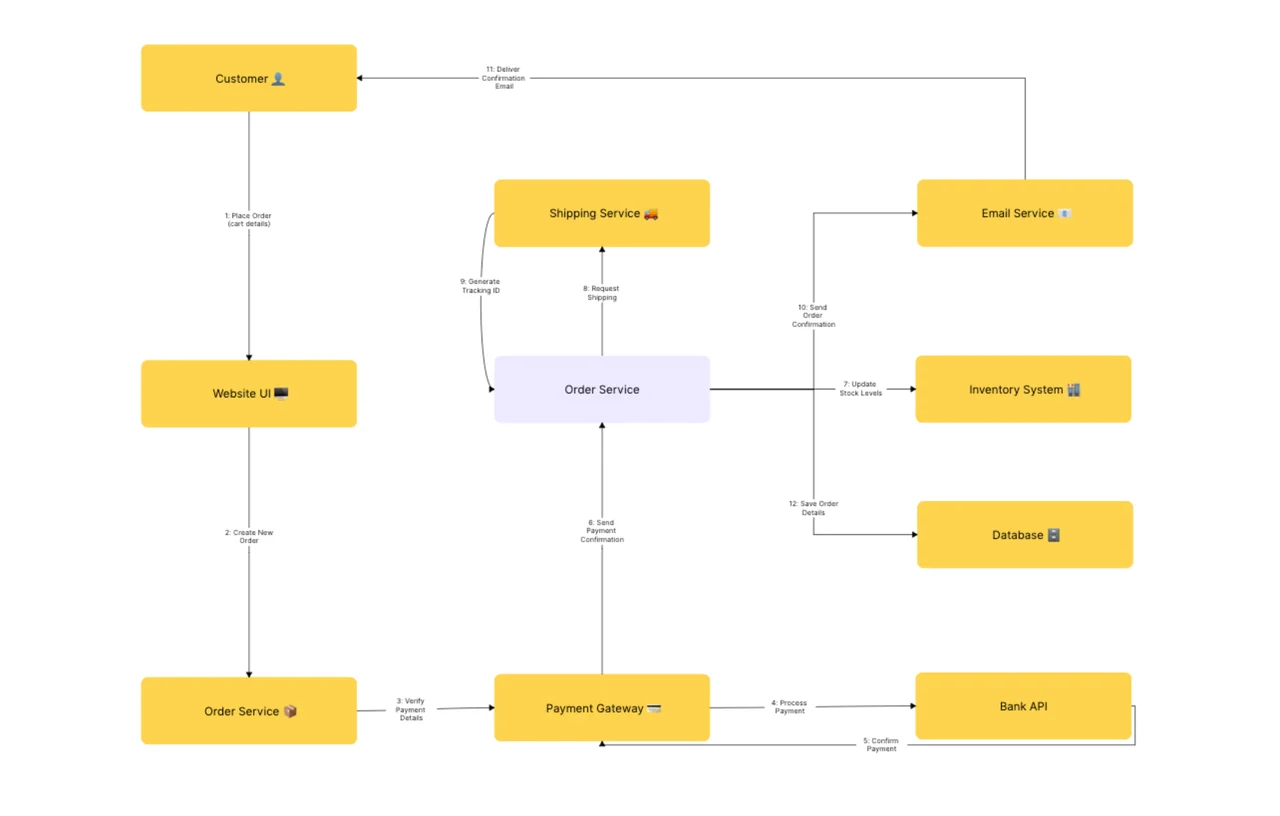
Free UML Communication Diagram Template (Objects, 2026)
Free UML communication diagram template for 2026. Model object interactions with numbered messages and links in minutes. Editable online with AFFiNE, no signup.
A communication diagram (renamed from collaboration diagram in UML 2.0; sometimes still called that today) is an interaction diagram in UML 2.5 that models how a set of objects exchange numbered messages through their links. Where a sequence diagram emphasizes the time ordering of messages along vertical lifelines, a communication diagram emphasizes the structural organization of the interacting objects and the links between them. This free template, built in AFFiNE's edgeless whiteboard, ships with the standard UML 2.5 communication notation in an editable canvas — no signup, no export limits.
Last updated June 2026 · Compatible with UML 2.5 specification · Built on open-source AFFiNE (50K+ GitHub stars)
Reach for a communication diagram when you are:
Skip it when the audience cares primarily about message timing or concurrency (use a sequence diagram instead) or when you're modeling an entity's lifecycle states (use a state diagram).
This template ships with the six core elements of the UML 2.5 communication notation:
| Element | Symbol | Purpose |
|---|---|---|
| Object / Lifeline | Rectangle labeled name:Class | An instance participating in the interaction |
| Actor | Stick figure | An external user or system that initiates messages |
| Link | Solid line between objects | A structural connection over which messages can flow |
| Message | Arrow with a sequence number and signature | A method call, signal, or asynchronous send |
| Sequence number | 1, 1.1, 1.1.1 prefix on each message | Encodes call order and nesting depth |
| Self-message | Arrow looping back to the same object | A method calling another method on the same instance |
The Object Management Group's UML 2.5 specification is the canonical source for notation rules; this template follows that spec.
"An Interaction is a unit of behavior that focuses on the observable exchange of information between connectable elements." — OMG Unified Modeling Language Specification, v2.5.1
On the message numbering convention used in this template, the same spec states:
"The communication diagram corresponds to a simple sequence diagram that uses none of the structuring mechanisms such as InteractionUses and CombinedFragments." — OMG Unified Modeling Language Specification, v2.5.1
Most teams produce a useful first-pass communication diagram in 20-40 minutes once the interaction scope and participating objects are agreed on. Follow these five steps:
Scope the interaction to one use case or scenario. Communication diagrams are scenario-bounded — pick a single use case (such as "Submit order") rather than trying to capture every interaction your system performs.
List the participating objects. Draw a rectangle for each instance involved and label it name:Class. Aim for 3-10 objects per diagram; if you exceed 12, decompose the interaction. IBM's requirements modeling guidance treats this ceiling as a readability threshold.
Connect objects with links. Draw a solid line between every pair of objects that exchange messages. The link represents the structural relationship that makes the message possible — without it, the interaction is invalid.
Add numbered messages along the links. For each method call, signal, or send, draw a small arrow on the link from sender to receiver and label it with a sequence number plus the message signature (for example, 1: submit(order), 1.1: validate(), 1.2: persist()). Use dotted numbering for nested calls.
Cross-check against a sequence diagram if the timing matters. A communication diagram and a sequence diagram model the same interaction from different angles. If reviewers ask "when does this happen relative to that?", a complementary sequence diagram is the clearer answer.
After step 5, switch to AFFiNE's page mode to capture object responsibilities, pre/post-conditions, and test scenarios alongside the diagram in one document — page and edgeless live in the same file.
| Diagram type | Best for | When to choose this instead |
|---|---|---|
| Communication diagram | Object structure + numbered message flow | You care about who-talks-to-whom and the relationships |
| Sequence diagram | Time-ordered messages along vertical lifelines | You care primarily about message timing or concurrency |
| Use case diagram | Functional scope and actors | You need to align stakeholders on what the system does |
| Activity diagram | Workflow with decisions and parallelism | You're modeling a multi-step process, not an interaction |
| State diagram | One entity's lifecycle | You're modeling state changes over time |
| Class diagram | Static structure of classes and relationships | You're designing the data model, not behavior |
For end-to-end coverage of the UML 2.5 family, browse the full diagram template library. For time-ordered interaction modeling that pairs naturally with communication diagrams, see the UML sequence diagram guide.
1, 1.1, 1.1.1 — even for tiny interactions.order:Order), not the class level. Don't paste class diagram boxes in — they belong in a class diagram.A UML communication diagram (formerly collaboration diagram before UML 2.0) is an interaction diagram defined by the UML 2.5 specification that models how a set of objects exchange numbered messages through structural links. It emphasizes the relationships between participating objects rather than the time ordering of messages.
Both diagram the same interaction. A sequence diagram lays the objects horizontally with vertical lifelines and shows messages top-to-bottom in time order — best for when questions. A communication diagram lays the objects spatially with link lines and uses numbered messages — best for who-talks-to-whom questions. The two views are complementary and routinely paired.
The six core elements are object / lifeline (instance labeled name:Class), actor (external initiator), link (structural connection), message (numbered arrow with signature), sequence number (1, 1.1, 1.1.1 for call order and nesting), and self-message (loop back to same object). These appear in this template as a ready-to-customize palette.
Yes — this template is free, requires no signup, and runs entirely in the browser via AFFiNE. You can edit, duplicate, export, or self-host the underlying open-source AFFiNE editor. No watermark, no upgrade prompt.
Use a communication diagram when the structural relationships between objects are the story (architecture reviews, coupling debates, "should A know about B?") and the timing is secondary. Use a sequence diagram when the message ordering is the story (race conditions, asynchronous flows, performance traces). Both views model the same interaction.
Industry-standard UML guidance suggests 3-10 objects per diagram as a working comfort zone, with 12 as a readability ceiling. Beyond that, decompose the interaction into smaller scoped diagrams or move the structural view to a class diagram. The same ceiling appears in IBM's published requirements-modeling guidance.
This template and accompanying guidance reflect the OMG UML 2.5.1 specification, IBM's published requirements-modeling guidance, and conventions widely adopted across enterprise software-engineering practice. Notation was reviewed against the ISO/IEC 19505 UML standard. Best-practice ceilings (3-10 objects per diagram, hierarchical sequence numbering) and time-investment figures reflect commonly cited industry guidance; verify against your team's internal standards before adopting them as hard rules.