Business Process Mapping: Steps, Symbols, Examples, and Tools
Business process mapping is the practice of showing how work moves from a defined trigger to a measurable outcome. A useful map names the steps, decisions, roles, inputs, outputs, handoffs, and exceptions that shape the real process. Use a simple flowchart for a straightforward sequence, swimlanes when ownership crosses roles, and BPMN when a shared formal notation is genuinely required.
This guide is for operations managers, process owners, business analysts, team leads, and cross-functional teams building a maintainable map for the first time.
Key takeaways
- Map the current process people actually follow before designing the process you want.
- Choose the lightest notation that answers the question; detail is useful only when it supports a decision.
- Treat handoffs, waits, rework, and exceptions as first-class steps because that is often where friction hides.
- Give every approved map an owner, review date, and change log so it remains working documentation.
Table of contents
- What is business process mapping, and what is it for?
- Process map vs. flowchart vs. swimlane vs. BPMN
- Common business process mapping symbols
- How to map a business process in 8 steps
- Copyable business process mapping worksheet
- Worked example: new client onboarding
- How to validate and maintain a process map
- Common business process mapping mistakes
- How AFFiNE can connect a visual map to working documentation
- Frequently asked questions
What is business process mapping, and what is it for?
Business process mapping is a method for visually documenting the sequence, ownership, decisions, inputs, outputs, and exceptions in a repeatable business process. It creates a shared model of how work happens so participants can verify the current state, locate friction, design improvements, train others, and maintain the process over time.
A process map is most valuable when work crosses a boundary: one team hands information to another, an approval pauses progress, or an exception sends the work backward. Begin with a question, not polished shapes. The question determines the scope and level of detail.
The American Society for Quality recommends defining boundaries, sequencing activities, involving people who do the work, and walking through the draft to test whether it is accurate. Its flowchart guidance also emphasizes mapping the current state before looking for bottlenecks, duplication, delays, and rework.
Process map vs. flowchart vs. swimlane vs. BPMN
These terms overlap, but they are not interchangeable. A process map is the broad category; a flowchart expresses sequence, a swimlane adds responsibility, and Business Process Model and Notation, or BPMN, is a formal standard.
| Format | Primary purpose | Typical complexity | Best used when |
|---|---|---|---|
| Simple process map | Show major stages, inputs, outputs, and boundaries | Low | Leaders or participants need a shared overview before detailed analysis |
| Flowchart | Show the order of tasks and decisions | Low to medium | One path or a small set of branches explains the process clearly |
| Swimlane diagram | Show sequence and who owns each action | Medium | Handoffs between people, teams, or systems are central to the problem |
| BPMN diagram | Model events, activities, gateways, messages, and flows with a formal notation | Medium to high | Business and technical stakeholders need a precise, shared modeling language |
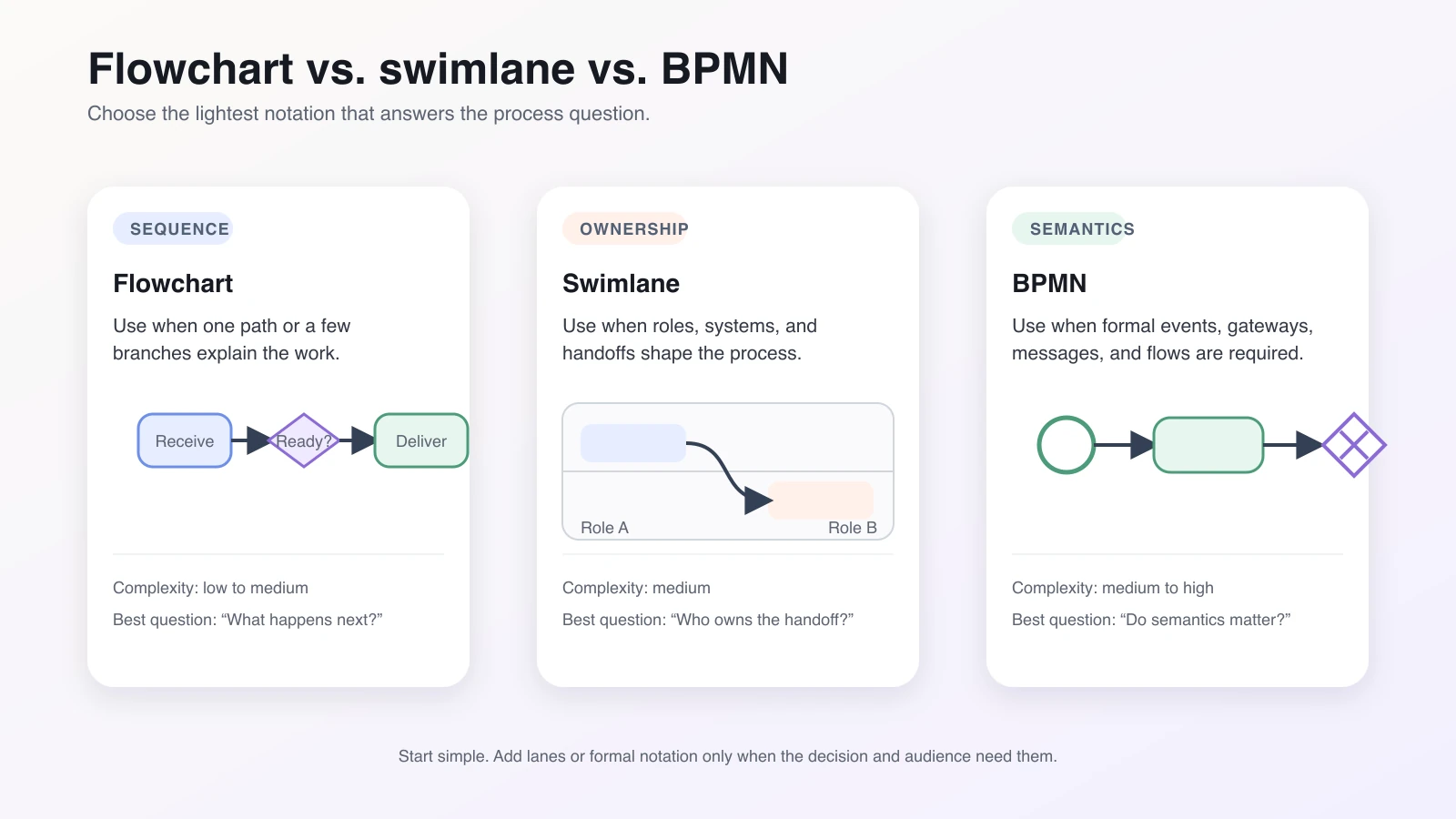
The Object Management Group describes BPMN as a graphical notation for business process diagrams that business users can understand while remaining precise enough for technical use. Consult the official BPMN specification materials when formal conformance matters. A diagram with a diamond and a few arrows is not automatically BPMN, and a swimlane can be useful without following every BPMN rule.
If your immediate goal is selecting software rather than learning the method, keep that commercial intent with the existing process mapping tools comparison. The rest of this guide stays method-first and tool-neutral.
Common business process mapping symbols
Start with a small visual vocabulary and publish a legend on the map. Common flowchart symbols are conventions, not proof that the map follows a single formal standard.
| Element | Common shape | Use it to show | Practical label example |
|---|---|---|---|
| Start/end | Rounded rectangle or oval | The trigger and completed outcome | “Signed agreement received” |
| Process/task | Rectangle | One action performed by a person or system | “Verify billing contact” |
| Decision | Diamond | A question that creates two or more paths | “Required fields complete?” |
| Connector/flow | Arrow | Direction and sequence | Label branch arrows “Yes” and “No” |
| Document/data | Document shape or parallelogram | A file, form, record, or input/output | “Client intake form” |
| Delay/wait | D-shaped delay symbol or explicit wait card | Time when no active work occurs | “Wait for client reply” |
| Swimlane | Horizontal or vertical band | Ownership by role, team, or system | “Account manager” |
Use one verb-led action per task: “Check tax ID” is better than “Tax ID.” Put the condition inside a decision and label every outgoing path. Show a delay only when it affects performance or ownership.
For a quick diagram, these symbols are enough. A dedicated online flowchart maker guide can help if your question is how different drawing tools handle connectors, templates, or collaboration. Teams comparing feature depth and pricing can instead use the flowchart software comparison.
How to map a business process in 8 steps
1. Define the objective and boundaries
State the decision this map must support, then name a clear trigger and end condition. “Improve onboarding” is too broad; “understand the path from signed agreement to completed kickoff” gives the team a boundary it can test.
Write what is out of scope. Link to adjacent processes instead of pulling them into this map.
2. Identify the owner and participants
Name one process owner with authority to approve the map and organize future reviews. Include the people who perform the work and receive incomplete handoffs, not only managers.
3. Collect facts about the current process
Observe the work, review forms and records, and interview participants. Ask: What starts this? What do you receive? What happens next? What can go wrong? Where do you wait? A procedure describes the intended path; a current-state map must include real workarounds and variations.
4. List activities, decisions, inputs, and exceptions
Capture each action with a verb and object. Add its input, output, responsible role, and supporting system or document. Record decisions as questions, note every outcome, and keep recurring exceptions beside the normal path.
5. Draw the current-state map
Arrange the confirmed steps from trigger to outcome. Use lanes when responsibility changes. Mark waits, rework loops, and manual transfers without fixing them yet. Date the draft and label it “current state.”
6. Validate handoffs and exceptions
Walk one normal case and at least two exceptions through the map. At each handoff, ask what moves, how the receiver knows it is ready, what happens when it is incomplete, and who owns the next action. Compare the map with a recent real case where possible.
7. Design and test the future state
Only after the current state is accepted should the team remove duplicate checks, clarify ownership, combine handoffs, change a decision rule, or introduce automation. Treat each change as a hypothesis and define a measure such as elapsed time or incomplete-return rate.
8. Assign a maintenance cycle
Approve the map with a named owner, version or date, review cadence, change log, and off-cycle triggers such as a policy, system, role, or recurring exception change. Publish it beside the SOP and records it depends on.
Copyable business process mapping worksheet
Complete this worksheet before drawing. For a small process, one row per field is enough. For a complex process, repeat the roles, steps, decisions, exceptions, and systems rows.
| Field | Copyable prompt | Your process |
|---|---|---|
| Scope | What is included, and what is explicitly excluded? | |
| Trigger | What event starts the process? | |
| Input | What information, material, or request must be available? | |
| Output | What observable outcome ends the process? | |
| Roles | Who supplies, performs, approves, supports, or receives the work? | |
| Steps | What verb-led activities occur, in actual order? | |
| Decisions | What questions change the path, and what are all outcomes? | |
| Exceptions | What common failures, variations, escalations, or rework loops occur? | |
| Systems/documents | Which forms, records, tools, policies, or templates support the work? | |
| Metrics | Which elapsed-time, quality, volume, or rework measures answer the objective? | |
| Owner | Who approves and maintains the process? | |
| Last reviewed | When was the map validated, by whom, and when is the next review? |
Worked example: new client onboarding
Suppose a small professional-services team wants to understand why new client kickoffs sometimes get rescheduled. The scope begins when a signed agreement is received and ends when a kickoff meeting is confirmed. The example is illustrative; it does not represent a real customer or promise an efficiency gain.
| # | Role | Activity or decision | Output | Observation |
|---|---|---|---|---|
| 1 | Account manager | Receive signed agreement | Onboarding request | Trigger |
| 2 | Account manager | Send intake form | Form link sent | Manual handoff to client |
| 3 | Client | Complete intake form | Submitted client details | Bottleneck: no stated response window |
| 4 | Operations | Check required fields | Completeness decision | Handoff from account manager to operations |
| 5A | Operations | If incomplete, return form with specific gaps | Revision request | Exception loop returns to client |
| 5B | Operations | If complete, create workspace and project record | Ready-for-kickoff record | Normal path |
| 6 | Project lead | Propose kickoff times | Scheduling options | |
| 7 | Client | Select time | Confirmed kickoff | End condition |
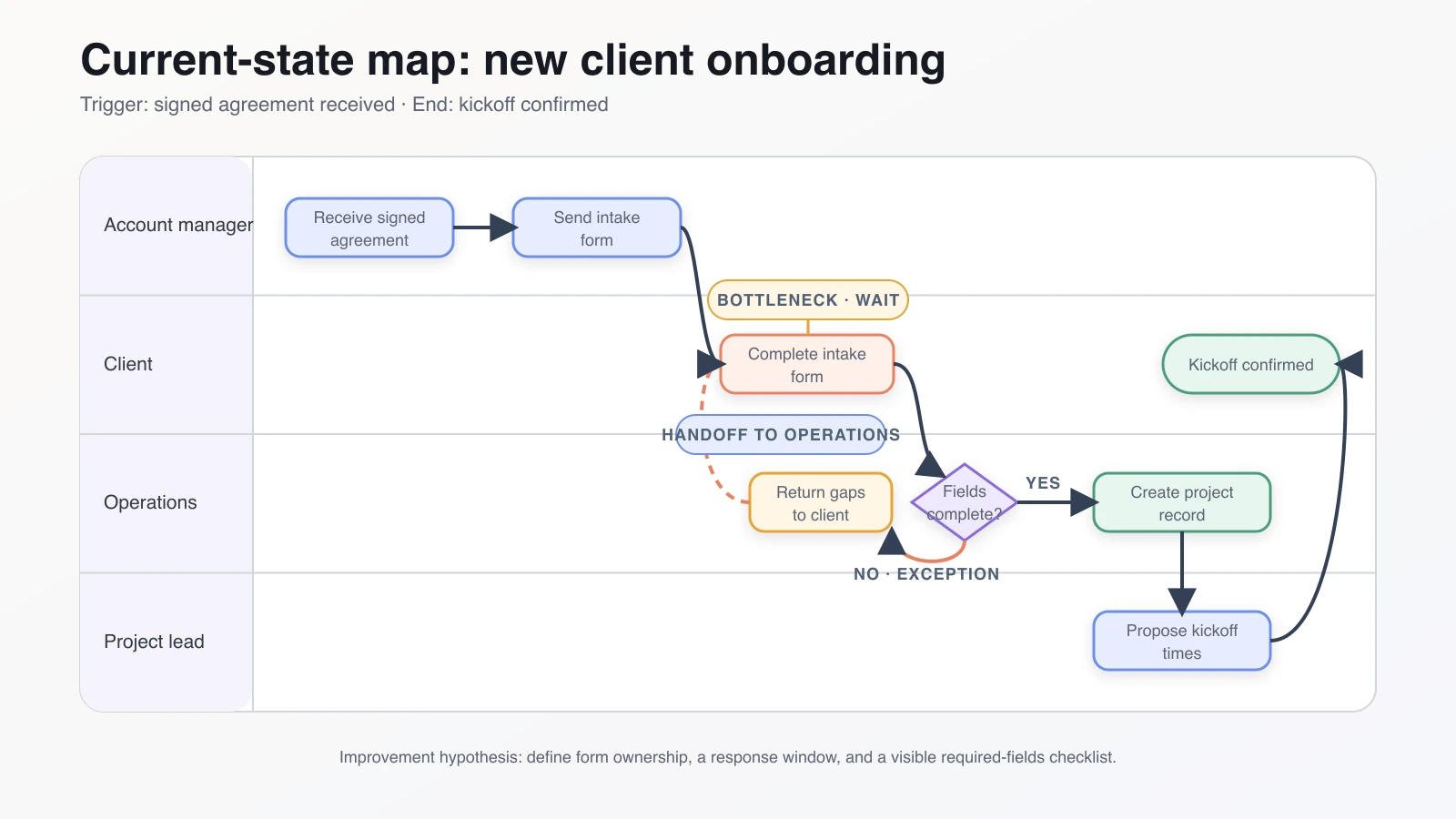
The first improvement hypothesis is not “automate onboarding.” It is narrower: assign the account manager ownership of the form follow-up, state a response window in the send step, and give the client a visible required-fields checklist. The team can pilot that change and compare elapsed time and incomplete-return rate with its own baseline.
The United States Agency for International Development's Business Process Review Methodology similarly distinguishes an “as-is” map of current reality from a “to-be” map informed by observed waste, redundancy, and participant input. That separation keeps improvement ideas from rewriting history.
How to validate and maintain a process map
A review meeting is not enough. Validation should follow the work.
- Walk the map in the actual work or systems. Ask the performer to narrate each action and completion signal.
- Test representative cases. Use one normal case, one incomplete input, and one escalation or rejection.
- Confirm every handoff. The sender and receiver should agree on the input, readiness rule, channel, and next owner.
- Record the approved version. Show the owner, approval date, last reviewed date, and status.
- Maintain a short change log. Record what changed, why, who approved it, and which supporting item also changed.
- Set a risk-based cadence. Review fast-changing, regulated, or incident-prone processes more often than stable, low-risk ones.
During maintenance, compare the diagram with current forms, job roles, system screens, and policies. If the map says “Operations approves” but the access rule now routes approval to Finance, the owner must update both the visual and the supporting instructions.
Common business process mapping mistakes
- Mapping the ideal instead of reality. Participants may describe policy, skip unofficial workarounds, or hide rework. Label the current state and verify it with actual cases.
- Adding detail without a decision purpose. Move clicks and field instructions into the SOP; keep the diagram at the level needed for analysis.
- Ignoring exceptions. The happy path rarely explains delays. Capture missing inputs, rejected requests, unavailable approvers, failed transfers, and escalation routes.
- Using ambiguous labels. Use a verb and object for tasks; put a question in each decision and label outgoing paths.
- Treating a handoff as an arrow. Record what moves, its readiness rule, channel, and next owner.
- Designing the future state too early. Improvement ideas can distort the evidence. Accept the current map before proposing a new one.
- Publishing without an owner or update rule. A map without ownership, dates, and change triggers becomes stale even if the first version is accurate.
How AFFiNE can connect a visual map to working documentation
AFFiNE can support a practical documentation workflow when a team wants visual discovery and written context in the same workspace. Use the AFFiNE whiteboard to arrange notes, shapes, connectors, and role lanes during a mapping workshop. Use AFFiNE Docs for the worksheet, SOP, decision notes, source links, owner, and review log.
A grounded workflow is:
- collect participant notes on an Edgeless canvas;
- organize the confirmed current-state flow;
- keep the scope, assumptions, and exception details in a page document;
- link the map to its SOP and decision record;
- update the owner and review date when the process changes.
This does not turn AFFiNE into a process-execution engine. Do not assume it validates BPMN conformance, discovers a process from event logs, executes approvals, enforces compliance controls, or provides a formal audit trail. Teams that need those capabilities should evaluate specialized BPM, process-mining, workflow-automation, or governance systems. AFFiNE is most credible here as a connected visual-and-written workspace.
Frequently asked questions
What is the main purpose of business process mapping?
The main purpose of business process mapping is to create a shared, testable view of how work moves from a trigger to an outcome. The map makes tasks, decisions, ownership, handoffs, waits, and exceptions visible so participants can verify reality, locate friction, design improvements, train others, and maintain consistent working documentation.
What are the basic steps in business process mapping?
Define the objective and boundaries, identify the owner and participants, collect facts, list activities and exceptions, draw the current state, validate handoffs and unusual paths, design and test a future state, and assign a maintenance cycle. Keep the current and future states separate so proposed improvements do not replace evidence.
What symbols are used in a business process map?
Common symbols include an oval or rounded rectangle for start and end, a rectangle for a task, a diamond for a decision, arrows for flow, a document or data shape for inputs and outputs, and a delay symbol for waits. Swimlanes organize those elements by role; formal BPMN uses a larger defined notation.
Is a process map the same as a flowchart?
A flowchart is a common type of process map, but process mapping is the broader practice. A basic process map may show stages, inputs, outputs, and boundaries. A flowchart emphasizes sequence and decisions. A swimlane adds responsibility, while BPMN adds standardized symbols and semantics for more formal business process modeling.
When should you use a swimlane diagram?
Use a swimlane diagram when several roles, teams, customers, suppliers, or systems participate and the handoffs matter. Place each task in the lane of the responsible actor. The crossing arrows then reveal transfers of information or ownership, making missing readiness rules, duplicated checks, and unclear accountability easier to discuss.
When is BPMN better than a simple flowchart?
BPMN is better when business and technical stakeholders need a formal shared notation for events, activities, gateways, messages, and flows, or when the model will support detailed system analysis. Use a simple flowchart when the audience only needs a clear sequence. Formal notation adds value only if participants understand and maintain it.
How often should a business process map be updated?
Set a cadence based on process risk and change rate rather than a universal interval. Also review the map when a policy, system, role, form, exception pattern, or control changes. Every approved map should show an owner, last reviewed date, next review point, and change log so users can judge its currency.
Turn the map into maintained working knowledge
Effective business process mapping begins with a bounded question, records the current state without polishing away its problems, and makes ownership and exceptions visible. Choose a flowchart, swimlane, or BPMN based on the decision and audience. Then validate the map with real cases, test improvement hypotheses, and give the approved version an owner and review cycle.
Start with the worksheet above. Bring the people who do and receive the work into the review, and keep the resulting map beside the documentation that makes it usable.