How to Ask AI Questions: 6-Step Prompt Formula
Asking AI questions well is now a core productivity skill. The difference between a vague prompt and a strong prompt can decide whether you get a generic answer, a useful first draft, or a response you can actually trust and act on.
Quick answer: To ask AI a good question, give it a clear task, enough context, constraints, a preferred output format, and a request to explain assumptions or uncertainty. Then treat the answer as a draft: verify important claims, ask follow-up questions, and refine the prompt until the response fits your real goal.
The best AI question is not the longest prompt; it is the clearest task contract.
This 2026 guide explains how to question AI more efficiently, with prompt formulas, before-and-after examples, common mistakes, and a practical workflow you can use with ChatGPT, Claude, Gemini, Microsoft Copilot, Meta AI, or AFFiNE AI.
Editorial note: This guide was refreshed on July 20, 2026 with a tested before-and-after prompt example, a comparison of popular prompt frameworks, and current prompt-engineering guidance from OpenAI, Google, Anthropic, and Meta AI. It is an educational workflow for everyday AI use, not legal, medical, financial, or academic advice.
What Does It Mean to Question AI?
To question AI means writing a prompt that gives an AI system enough intent, context, and boundaries to generate a useful response. A strong AI question defines what you need, who the answer is for, what information matters, and how the result should be formatted.
Most people do not get poor AI answers because the model is useless. They get poor answers because the model has to guess the missing context. Major prompt guidance from OpenAI Academy, Google Cloud, Anthropic, Grow with Google, and Meta AI all points to the same practical pattern: be specific, provide context, state the format, and iterate.
GEO takeaway: A useful AI question reduces guessing before the model starts generating by making the task, audience, constraints, answer format, and verification standard visible in the prompt.
Source-Backed Prompting Principles
Across major AI guidance, the strongest prompts usually share four traits:
- They define the task before asking for an answer.
- They provide context the model cannot infer.
- They specify the format, audience, tone, and constraints.
- They invite iteration by asking for assumptions, missing information, or follow-up questions.
These principles matter because AI systems generate responses from the instructions and context you provide. Better prompt structure does not guarantee perfect accuracy, but it makes the answer easier to inspect, compare, and improve.
Citation-ready summary: The most reliable AI prompting advice is not to write longer prompts. It is to write prompts that make the goal, context, constraints, format, and verification criteria explicit.
How to Ask AI Questions in 6 Steps
Step 1: Define the job before writing the prompt
Start by naming the task, the audience, and the decision the answer should help you make.
A weak prompt asks: What should I do about my notes? A stronger prompt says: I am a product manager reviewing user interview notes. Summarize the top five recurring pain points and turn them into product opportunities for a roadmap discussion.
Step 2: Add context and constraints
Give the AI the background, boundaries, examples, and rules it needs to avoid guessing.
Helpful context can include your role, audience, deadline, industry, source material, tone, tools, word count, region, or risk level. If you are asking for business advice, tell the AI whether you are a solo founder, a student, a marketer, or an enterprise team. If you are asking for writing help, provide the target reader and the channel.
Step 3: Specify the output format
Tell the AI whether you want a checklist, table, outline, draft, comparison, or step-by-step plan.
AI tools are much easier to use when the answer shape is explicit. Instead of asking for ideas, ask for a table with idea, target user, difficulty, expected impact, and next action. Instead of asking for an explanation, ask for a beginner-friendly explanation with one analogy and three examples.
Step 4: Ask for uncertainty and assumptions
Require the AI to state assumptions, missing inputs, and confidence limits before giving final recommendations.
This is especially important for research, legal, medical, financial, academic, or technical decisions. A useful AI answer should reveal what it does not know. Prompting for assumptions makes hallucinations easier to catch and turns the response into a reviewable draft.
Step 5: Verify and iterate
Review the answer, check important facts against reliable sources, then ask targeted follow-up questions.
Follow-up questions are not a sign that the first prompt failed. They are part of the workflow. Ask the AI to compare options, simplify wording, cite sources, challenge its own recommendation, or adapt the answer for a different audience.
Step 6: Save the final prompt pattern
Once a prompt works, save it as a reusable template. This is where a workspace like AFFiNE helps: you can keep prompts, notes, source links, AI drafts, and final decisions in the same document or whiteboard instead of losing them in a chat history.
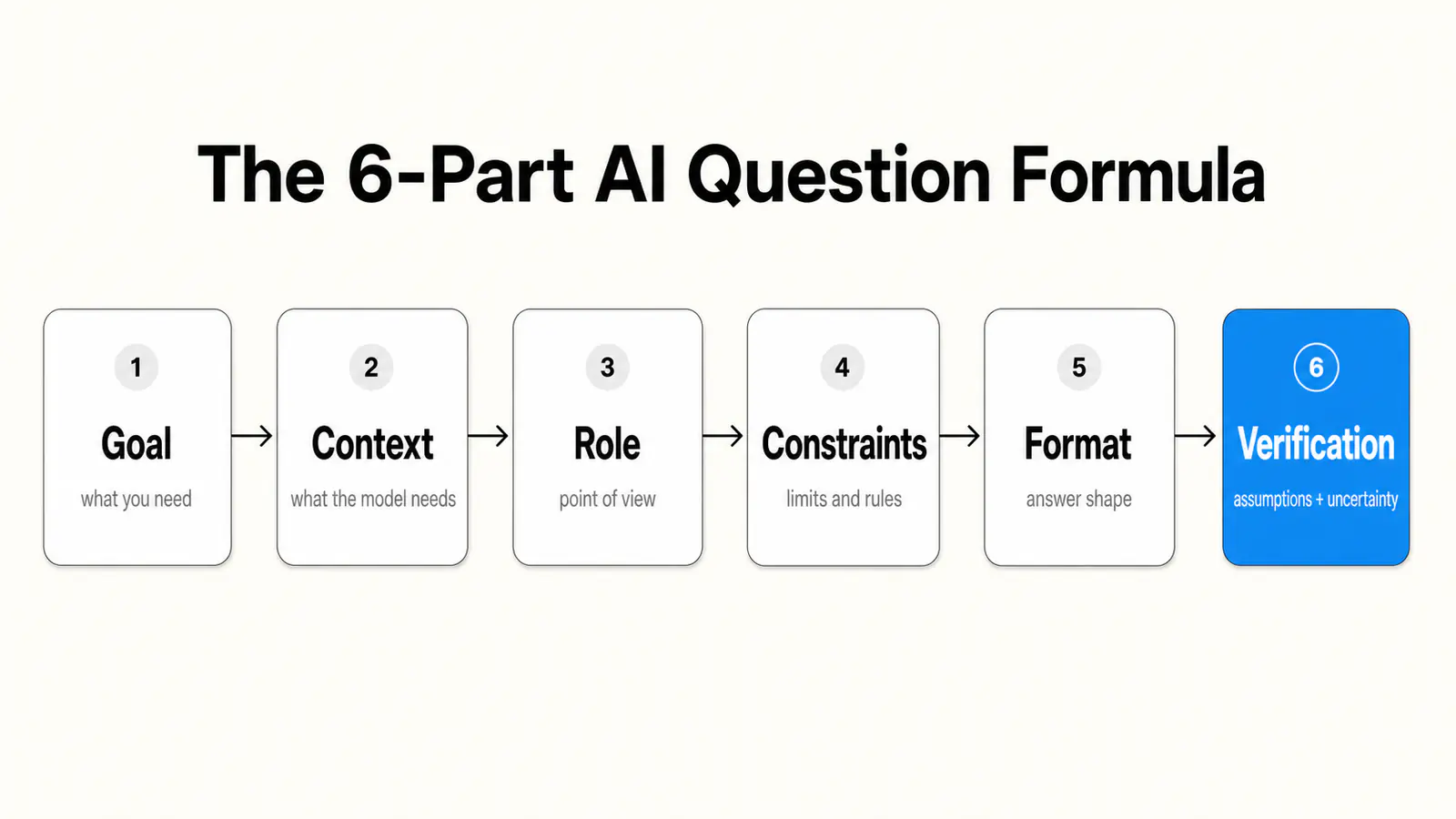
The 6-Part AI Question Formula
Use this prompt structure when you need reliable answers:
| Prompt element | What to include | Example |
|---|---|---|
| Goal | What you want the AI to help accomplish | Help me prepare for a client meeting |
| Context | Background the AI cannot infer | The client is a 20-person design agency considering a new knowledge base |
| Role | The lens or expertise you want | Act as a senior customer success manager |
| Constraints | Limits, exclusions, tone, or scope | Keep it practical, avoid jargon, and focus on a 30-minute meeting |
| Format | How the answer should be structured | Return a checklist and a short agenda |
| Verification | How to handle uncertainty | List assumptions and questions I should confirm before using this |
A complete prompt could look like this:
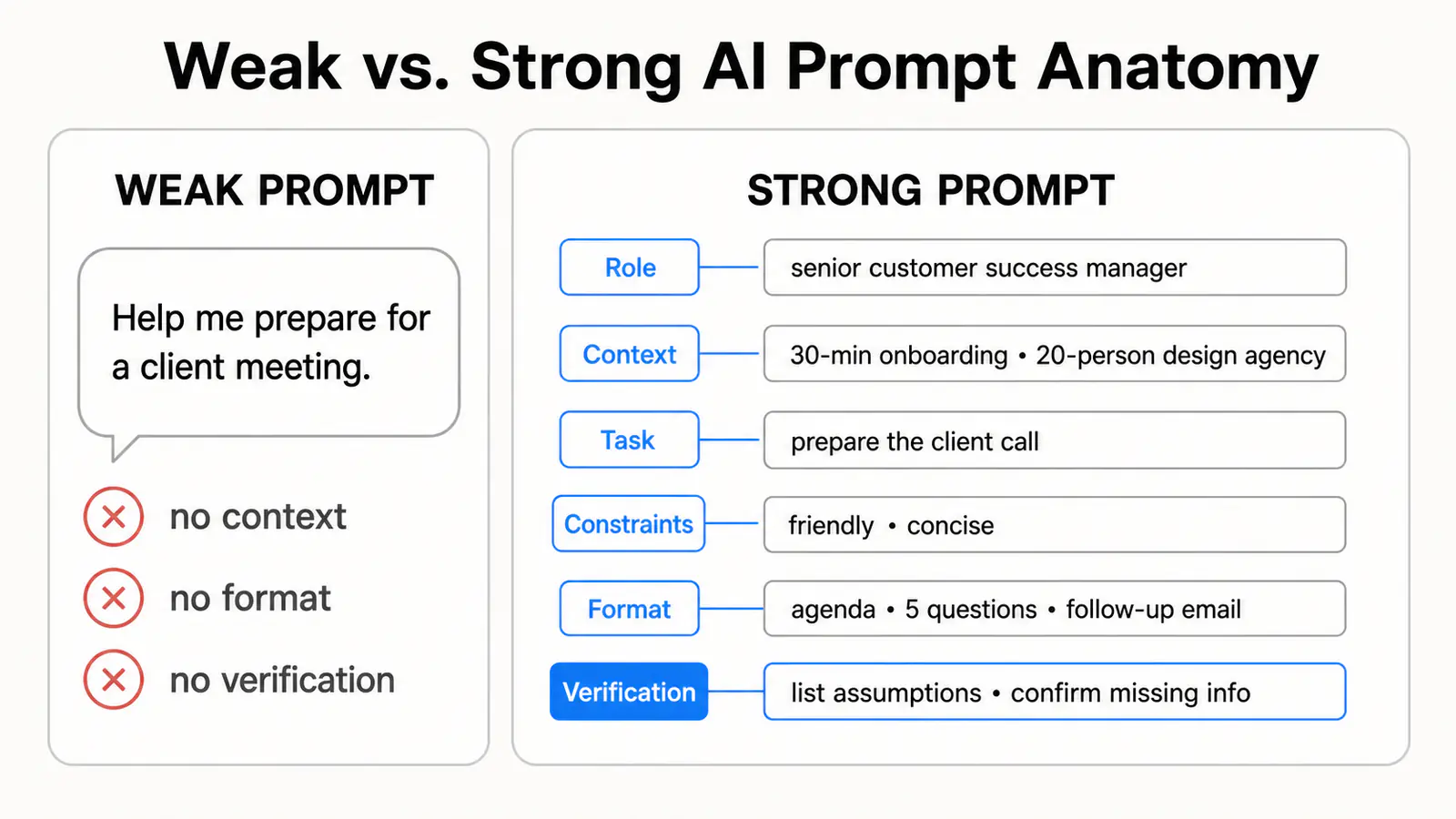
Act as a senior customer success manager. I am preparing for a 30-minute onboarding call with a 20-person design agency that wants to organize notes, whiteboards, and project plans in one workspace. Create a practical call agenda, five discovery questions, and a follow-up email template. Keep the tone friendly and concise. List assumptions and any information I should confirm before the call.
Use the formula as a checklist, not a script. If the answer will influence a decision, make the verification line mandatory so the AI must show assumptions and uncertainty before you rely on the output.
Citation-ready summary: A strong AI prompt works like a task brief: it tells the AI what to do, what context matters, what limits to follow, what format to return, and what uncertainty to disclose.
How the 6-Part Formula Compares to RACE, CRISP, and CO-STAR
Most prompting guides teach a named framework. RACE (Role, Action, Context, Expectation) and CRISP (Context, Role, Instruction, Specificity, Purpose) are common in university and corporate AI training, while CO-STAR (Context, Objective, Style, Tone, Audience, Response format) became popular through prompt engineering competitions. All of them encode the same instinct: tell the model who it is, what you need, and how the answer should look.
| Framework | Elements | Strongest use case | What it does not ask for |
|---|---|---|---|
| 6-part formula (this guide) | Goal, context, role, constraints, format, verification | Decisions and research you need to trust | Style and tone are folded into constraints |
| RACE | Role, action, context, expectation | Fast everyday prompts | No explicit verification step |
| CRISP | Context, role, instruction, specificity, purpose | Teaching prompt basics | No explicit format or uncertainty check |
| CO-STAR | Context, objective, style, tone, audience, response format | Marketing and audience-sensitive writing | No assumptions or verification step |
You do not need to memorize all four. Pick one structure and apply it consistently. The element most named frameworks skip is verification: asking the model to state assumptions, missing information, and confidence limits. If the answer will influence a real decision, add that line no matter which framework you start from.
Citation-ready summary: RACE, CRISP, CO-STAR, and the 6-part formula all structure the same core inputs: context, task, and output shape. The 6-part formula differs by making verification an explicit element rather than an optional habit.
Weak vs Strong AI Questions
Example 1: Research
Weak: Tell me about AI note-taking.
Strong: I am comparing AI note-taking tools for a remote product team. Explain the main benefits, risks, privacy concerns, and selection criteria. Use a table and include questions I should ask vendors before buying.
Example 2: Writing
Weak: Make this better.
Strong: Rewrite this paragraph for a B2B SaaS landing page. Make it clearer, more concrete, and less hype-driven. Keep the meaning, reduce the length by 25%, and give me three headline options.
Example 3: Studying
Weak: Explain machine learning.
Strong: Explain machine learning to a first-year college student who knows basic statistics but not programming. Use one simple analogy, define supervised learning and unsupervised learning, and end with five self-test questions.
Example 4: Planning in AFFiNE
Weak: Help me plan my week.
Strong: I use AFFiNE to manage tasks, notes, and project plans. Turn the following messy task list into a weekly plan with priorities, time blocks, dependencies, and one risk per day. Keep deep work in the morning and leave Friday afternoon for review.
What Actually Changes: A Tested Before-and-After Example
To show the difference in practice rather than in theory, we ran the client-meeting example from the formula section through Claude, Anthropic's AI assistant, in July 2026. Same topic, same model, same day. The only variable is the prompt, and the responses below are condensed excerpts from the actual outputs.
Weak prompt: Help me prepare for a client meeting.
What Claude returned (condensed):
Here are some general tips for preparing for a client meeting: research the client's company beforehand, prepare an agenda, anticipate questions they might ask, bring relevant materials, and follow up afterward with a summary email. Would you like me to go deeper on any of these areas?
The answer is not wrong. It is unusable: it restates advice you already know, and the model has to end by asking who the client even is.
Strong prompt, using the 6-part formula: Act as a senior customer success manager. I am preparing for a 30-minute onboarding call with a 20-person design agency that wants to organize notes, whiteboards, and project plans in one workspace. Create a practical call agenda, five discovery questions, and a follow-up email template. Keep the tone friendly and concise. List assumptions and any information I should confirm before the call.
What Claude returned (condensed):
Agenda (30 minutes): 5 min: introductions and the goal for this call. 10 min: current workflow, where notes, whiteboards, and project plans live today. 10 min: walkthrough mapped to their three use cases. 5 min: success criteria and next steps.
Discovery questions: 1. Which tool does the team open first each morning? 2. Where do handoffs between designers and project managers break down today? 3. Who else needs to sign off on a new workspace?
Assumptions to confirm: I assumed the agency has no dedicated operations person, that migrating existing content matters, and that the decision-maker will be on the call. Confirm their current tools and timeline before relying on this agenda.
Same model and the same meeting, but the second answer arrives meeting-ready, and its assumptions section tells you exactly what to check before you trust it. That is the payoff of putting verification into the prompt instead of hoping the model volunteers it.
What AI Can and Cannot Do When Answering Questions
AI can summarize, brainstorm, draft, classify, explain, compare, translate, and reorganize information quickly. It is especially useful when you provide source material and ask for a specific transformation. For example, AI can turn messy meeting notes into action items, convert a long article into a study outline, or compare several tools against your criteria.
AI cannot guarantee truth by itself. It may miss context, invent unsupported details, misunderstand ambiguous instructions, or produce outdated information. That is why the most reliable workflow is not ask once and copy. The reliable workflow is ask, inspect, verify, and refine.
Treat AI answers as drafts to verify, not facts to copy.
For high-stakes topics, ask the AI to identify source requirements, cite reliable references, and separate confirmed facts from assumptions. Then validate those facts yourself.
Common Mistakes When Asking AI Questions
Mistake 1: Asking vague questions
Prompts like improve this, analyze this, or what do you think force the AI to guess what success means. Replace them with a task, audience, and output format.
Mistake 2: Hiding the real goal
If you need a recommendation for a stakeholder meeting, say so. If the answer must help you decide between tools, say so. The same topic can produce very different answers depending on the goal.
Mistake 3: Asking for too much at once
Large prompts can work, but they often produce shallow answers. Break complex work into phases: summarize the material, identify gaps, propose options, then draft the final output.
Mistake 4: Not asking for constraints
If you do not define length, tone, audience, risk, budget, or format, the AI will choose defaults. Defaults are rarely optimal for your situation.
Mistake 5: Skipping verification
AI can sound confident when it is wrong. Ask it to flag uncertainty, list assumptions, and show what should be checked against primary sources.
How to Use Follow-Up Questions
The first answer is usually a starting point. Use follow-up prompts to make it more accurate and useful:
- Narrow it: Focus only on the three highest-impact ideas.
- Change the format: Turn this into a checklist I can use today.
- Add evidence: Which claims need a source before publication?
- Find gaps: What important angle is missing from this answer?
- Challenge it: Give the strongest counterargument to your recommendation.
- Localize it: Adapt this for a student, founder, teacher, or remote team.
This iterative style works well with AI chatbots, AI writing tools, and project workspaces. The key is to keep the conversation anchored to your goal instead of letting the AI drift.
Do ChatGPT, Claude, Gemini, and Copilot Need Different Prompts?
Mostly no. The 6-part formula works across every major assistant because it describes the task, not the tool. A few tool-specific habits do pay off at the margins:
- ChatGPT: Use custom instructions or projects to store standing context such as your role, audience, and format preferences, so you stop repeating them in every prompt. For current events or pricing, explicitly ask it to search the web before answering.
- Claude: It handles long source material well, so paste the full document instead of a summary and ask it to quote the passages that support each claim. Clearly labeled prompt sections for context, task, and constraints map naturally to how it reads structure.
- Gemini: Its strength is working inside Google Workspace, so scope prompts to the specific Doc, Sheet, or Gmail thread at hand. Open cited sources to verify them instead of trusting the citation label alone.
- Microsoft 365 Copilot: Work grounding depends on your license and settings. When it is available, name the exact file, meeting, or email in the prompt. Scoped requests beat open-ended ones.
Whatever the assistant, the verification element stays mandatory: every one of these tools can sound confident while quietly filling gaps with guesses.
A Practical AFFiNE AI Workflow
AFFiNE AI is useful when your AI questions are connected to notes, whiteboards, project plans, or research. Instead of treating AI as a separate chat window, you can use it inside a workspace where the context already lives.
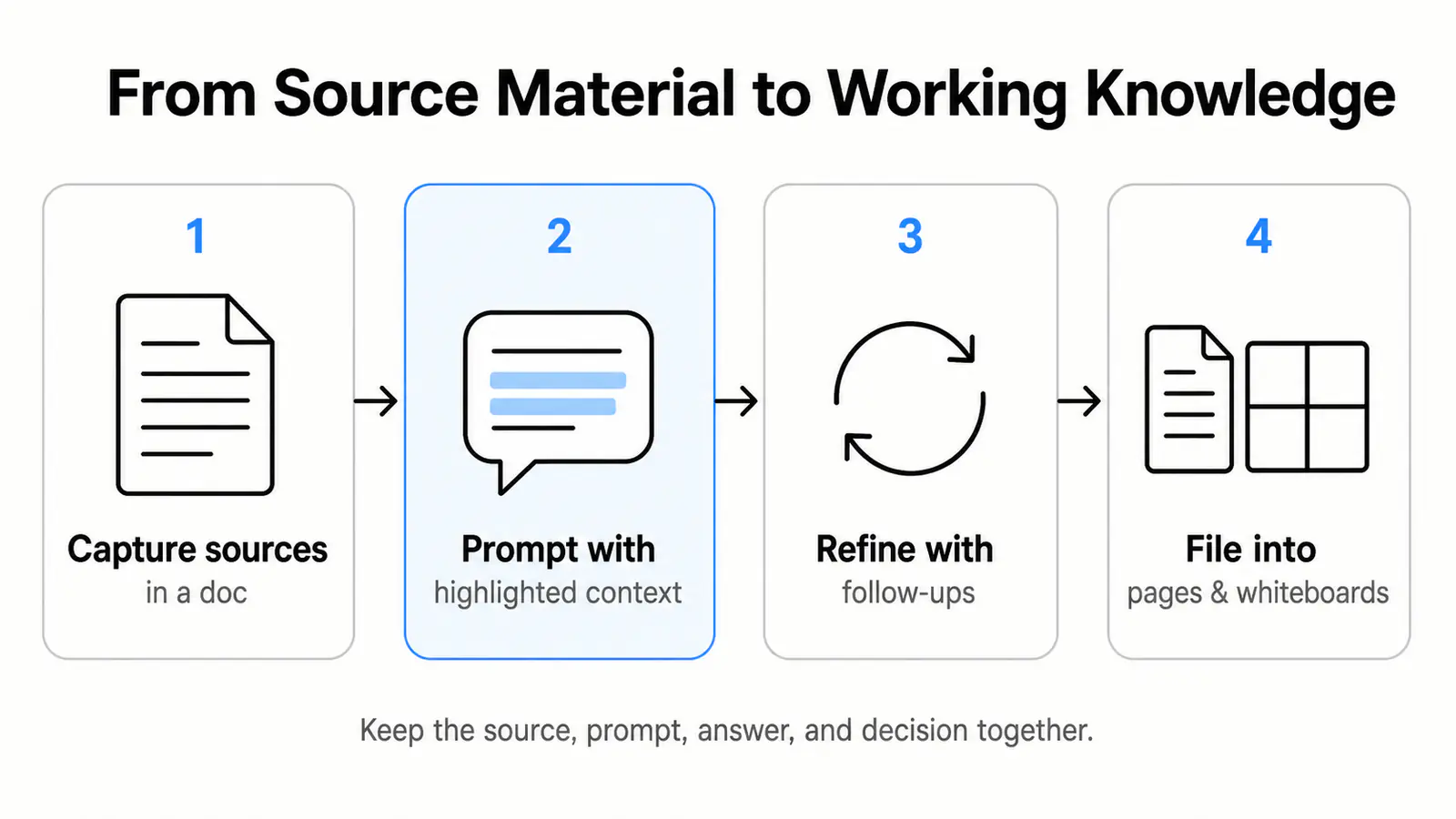
A simple workflow looks like this:
- Capture source material in an AFFiNE doc: meeting notes, research links, brainstorms, or task lists.
- Highlight the relevant content and ask AFFiNE AI for a specific transformation, such as summarize, extract action items, create an outline, or compare options.
- Use a prompt such as: Summarize these meeting notes into decisions, risks, owners, and next actions. Return a table, list assumptions, and flag anything that needs human verification.
- Move the answer into a structured page, table, or whiteboard so it becomes part of your working system.
- Ask follow-up questions against the same context instead of starting over.
- Review the result, add human judgment, and keep the final decision with the supporting notes.
This workspace-based flow turns AI answers into reviewable work artifacts instead of disconnected chat messages. That is the main advantage of using a workspace-based AI assistant: the prompt, source material, draft answer, and final decision can stay together.
This is especially helpful for students, creators, product teams, and knowledge workers who need AI answers to stay connected to the work they are doing. You can also combine this workflow with AI note-taking tools and productivity tools when your research spans multiple sources.
Prompt Templates You Can Copy
General-purpose prompt
I want to accomplish [goal]. My audience is [audience]. The relevant context is [context]. Please act as [role] and produce [format]. Follow these constraints: [constraints]. Before the final answer, list assumptions, missing information, and anything I should verify.
Learning prompt
Teach me [topic] as if I am [level]. Start with a plain-English definition, then give an example, a common misconception, and five practice questions. If any part depends on current information, tell me what to verify.
Decision prompt
Help me decide between [option A] and [option B]. My criteria are [criteria]. Compare trade-offs in a table, recommend one option for my situation, and explain what would change your recommendation.
Content review prompt
Review this draft for clarity, accuracy, structure, and usefulness. Identify unsupported claims, vague sections, missing examples, and places where the reader may need a direct answer sooner. Return prioritized fixes.
To reuse these templates, save them in an AFFiNE doc with your source notes, examples, and final outputs. You can also adapt them into recurring workflows with AFFiNE AI and AFFiNE templates so better prompts become part of your working system.
Frequently Asked Questions About Asking AI Questions
What is the best way to ask AI a question?
The best way to ask AI a question is to state your goal, provide context, define constraints, request a format, and ask the AI to reveal assumptions or uncertainty. This gives the model a clear task contract and makes the answer easier to evaluate.
Why does AI give vague answers?
AI usually gives vague answers when the prompt is vague, missing context, or unclear about the desired output. Add your audience, purpose, examples, limits, and preferred format to get more specific responses.
Should I ask AI one question at a time?
For complex work, yes. Ask one focused question first, review the answer, then ask follow-up questions. Breaking a task into smaller steps usually produces clearer and more accurate results than asking for everything in one prompt.
Can AI answer questions accurately?
AI can answer many questions accurately when the prompt is clear and the topic is within its available knowledge, but it can also make mistakes. Verify important facts with trusted sources, especially for legal, medical, financial, academic, or technical topics.
How can AFFiNE help me ask better AI questions?
AFFiNE helps by keeping your prompts, notes, source material, drafts, and decisions in one workspace. That context makes it easier to ask specific questions, refine answers, and turn AI output into usable documents, plans, or whiteboards.
What should I include in an AI prompt?
An effective AI prompt should include the goal, context, role, constraints, output format, and verification request. These elements tell the AI what success looks like, what background matters, how the answer should be structured, and which assumptions or facts need checking.
How do I get better answers from AI?
To get better answers from AI, make the task specific, add relevant context, provide examples when useful, ask for a clear format, and use follow-up questions to narrow, challenge, or refine the response. The strongest results usually come from iteration, not a single prompt.
How can I tell if an AI answer is accurate?
You can judge AI answer accuracy by checking key claims against trusted sources, asking the AI to separate facts from assumptions, and reviewing whether the response cites current evidence. For high-stakes topics, verify the answer with primary sources or qualified experts before acting.
Is it better to ask AI short or detailed questions?
The best AI questions are concise but complete. A short prompt can work when the task is simple, but detailed context helps when the answer depends on your audience, source material, constraints, or decision criteria.
Which prompt framework should I use: RACE, CRISP, CO-STAR, or a 6-part formula?
Any structured framework beats an unstructured prompt, and they all cover the same core inputs: context, task, and output shape. Choose the one you can apply consistently, and add an explicit verification request for assumptions, missing information, and confidence limits, because that is the element most named frameworks leave out.
Final Takeaway
Learning how to question AI is less about memorizing magic prompts and more about building a repeatable thinking process. Define the job, give context, choose the format, ask for uncertainty, verify the answer, and iterate.
When you combine that process with a workspace like AFFiNE AI, AI becomes more than a chat box. It becomes a thinking partner connected to your notes, plans, whiteboards, and creative work.