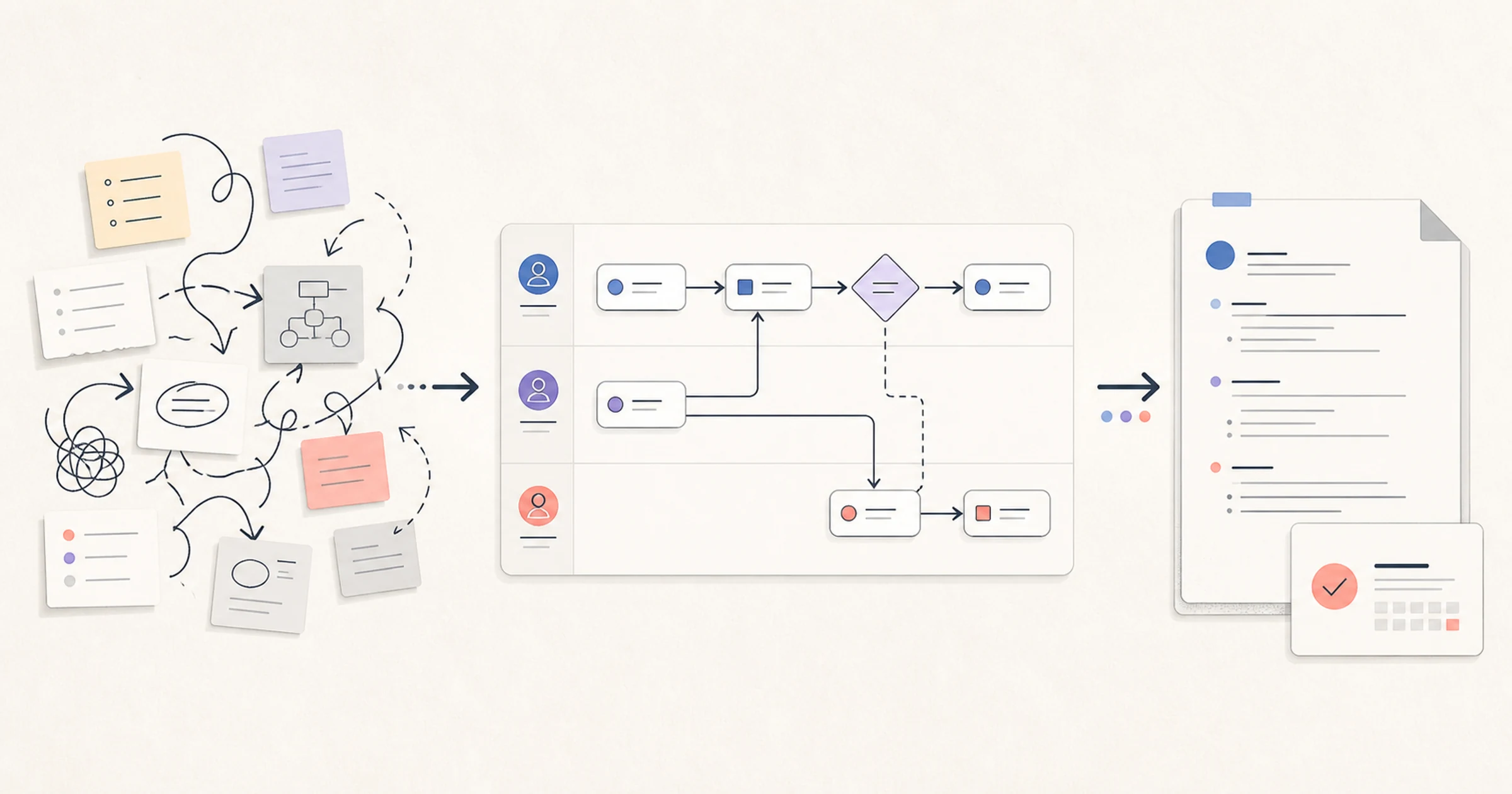
Process Map Template: 7 Types, Symbols, and Editable Examples
A process map template is a reusable visual structure for documenting how work moves from a trigger to an outcome. Choose a basic flowchart for sequence, a swimlane for handoffs, SIPOC for scope, or a value stream map starter when material, information, and timing data matter. A useful template exposes missing steps and ownership—not merely a tidy picture.
This guide is for operations managers, process owners, business analysts, project managers, team leads, and anyone who needs to turn an unclear repeatable process into a map that others can review.
Key takeaways
- Start with the question you need the map to answer; then choose the lightest template that can answer it.
- Label every task with a verb, every decision branch with an outcome, and every approved map with an owner and review date.
- Keep a process diagram, its supporting procedure, and an executable workflow distinct.
- Validate the draft with the people who perform and receive the work before you design a future state.
Table of contents
- Choose the right process map template
- What is included in this process map template pack?
- 7 process map templates and when to use each
- Common process mapping symbols
- How to fill a process map template in 6 steps
- Three filled process map examples
- Process map validation checklist
- Process map template vs. workflow template vs. SOP
- How to build and maintain a process map in AFFiNE
- Common mistakes
- Frequently asked questions
Choose the right process map template
Choose the template by what is unclear: sequence, ownership, scope, detail, or waste.
| Your primary question | Choose | Detail | Maintenance burden | Avoid when |
|---|---|---|---|---|
| What happens next? | Basic flowchart | Low | Low | Several roles and handoffs drive the problem |
| What are the major stages? | High-level process map | Low | Low | A reader must perform the work from the map |
| What decisions and exceptions occur? | Detailed process map | High | High | The audience needs only an overview |
| Who owns each action and handoff? | Swimlane process map | Medium | Medium | Ownership is irrelevant or still unknown |
| What is inside the process boundary? | SIPOC | Low | Low | The team needs task-level sequence |
| What happens now, and what should change? | Current/future-state pair | Medium to high | High | The current state has not been validated |
| Where do material, information, time, and waste move? | Value stream map starter | High | High | You do not have actual flow and timing data |
Use common flowchart conventions for a straightforward discussion. If formal semantics matter, define the notation before drawing. Business Process Model and Notation (BPMN) has a formal Object Management Group specification; a diamond does not make a simple flowchart BPMN.
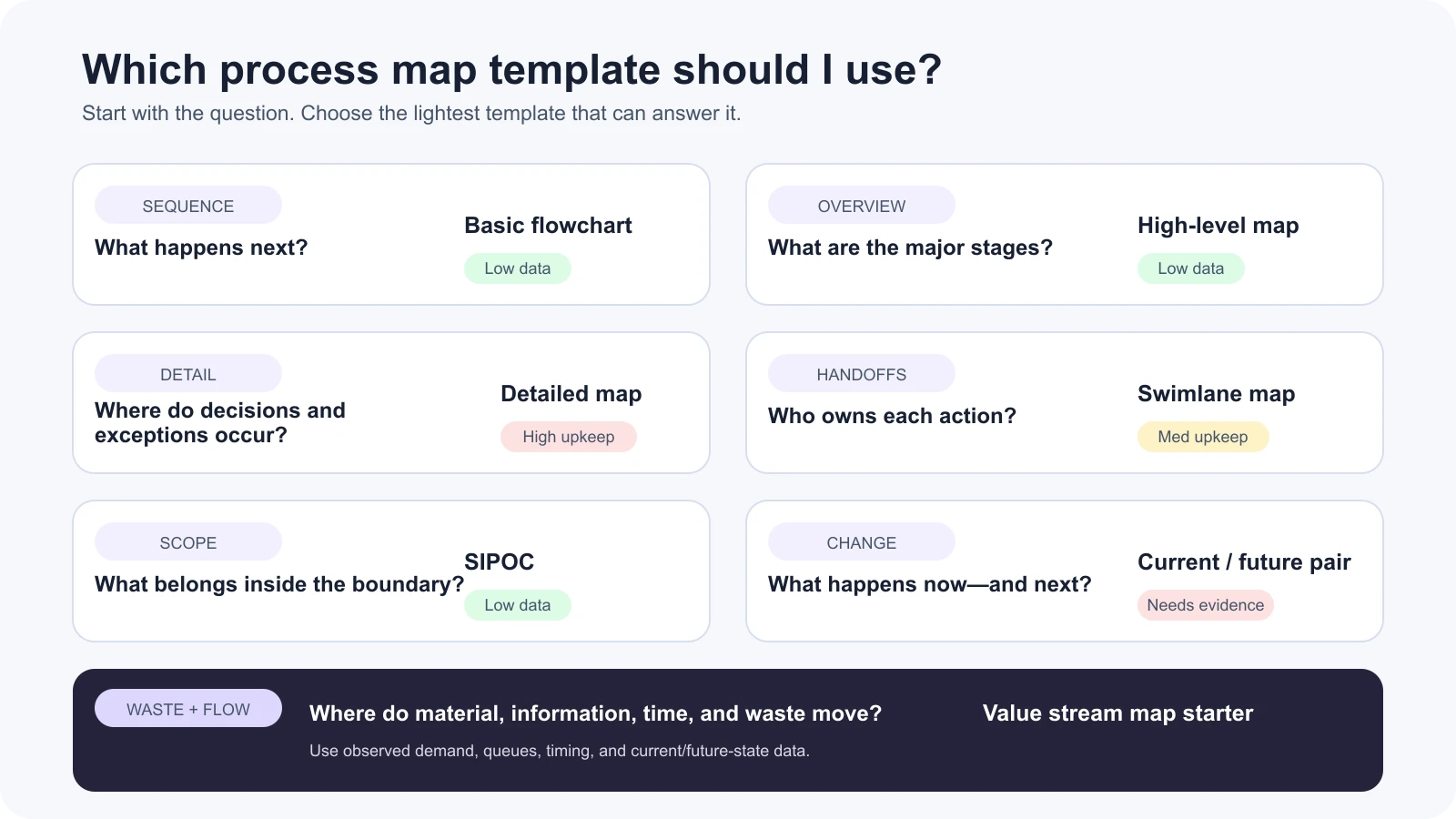
Choose by the problem the map must resolve, not by which diagram looks most sophisticated.
What is included in this process map template pack?
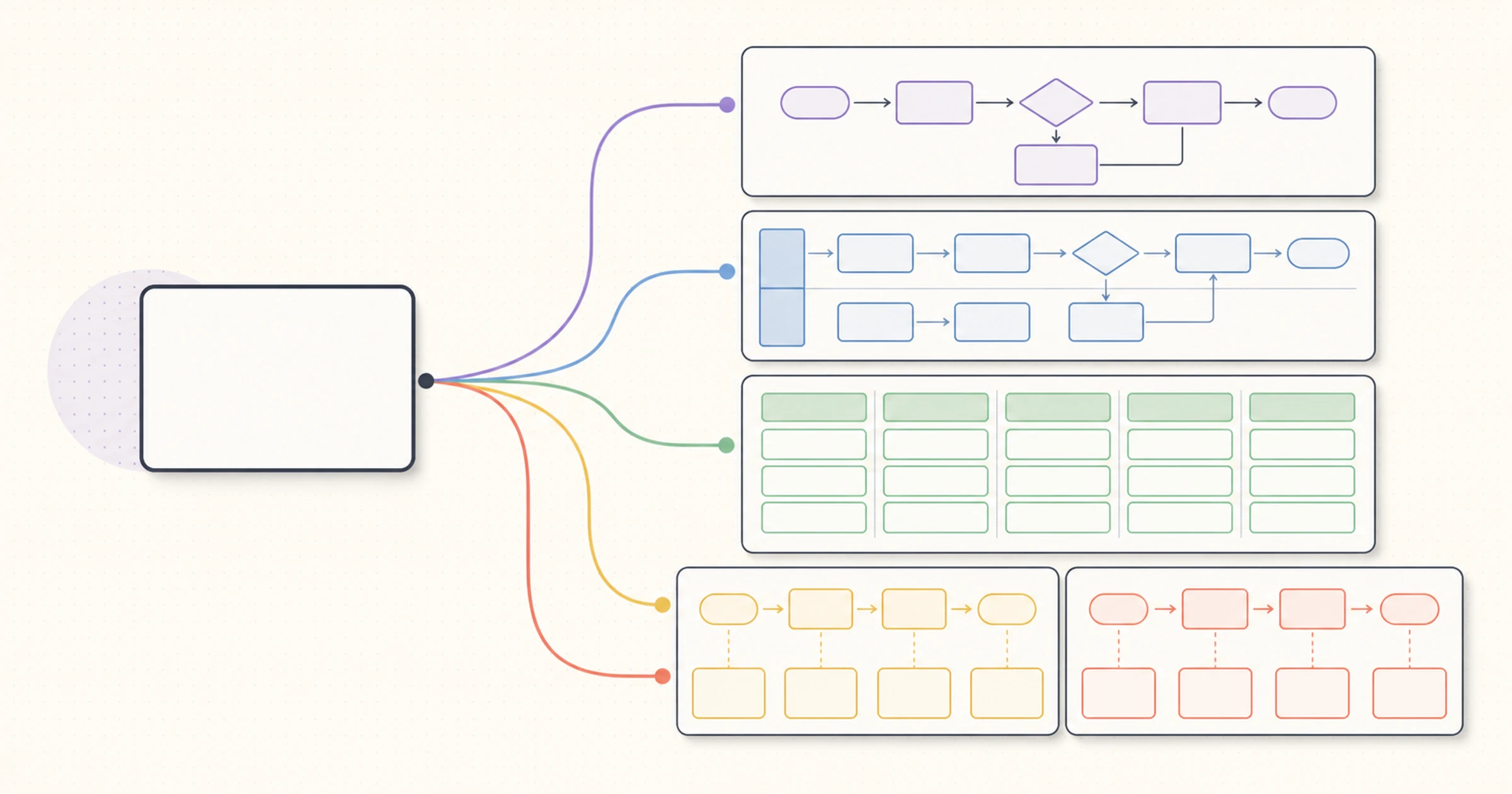
The pack includes seven copyable Markdown starters, editable SVG sources, WebP previews, and three filled examples. Each uses the same contract: purpose, blank layout, required labels, mini example, failure mode, and a do not use boundary. Download the editable process map SVG pack, then adapt the labels and metadata to your process.
Compare process mapping tools before choosing software. For a simple sequence, an online flowchart maker may be quicker.
7 process map templates and when to use each
1. Basic flowchart template
Purpose: Show a short sequence with few decisions. Blank layout: Start → Action → Decision? → Action → End. Required labels: trigger, verb-led tasks, decision question, branch outcomes, and end condition.
Mini example: Brief received → Draft content → Ready for review? → Yes: Schedule content → End; No: Revise draft → Ready for review? The return path prevents a rejected draft from becoming a dead end.
Failure mode: Noun labels such as Content or Review hide the action. Start tasks with verbs and keep one action per box.
Do not use this when: Team handoffs are central. Use a swimlane instead. American Society for Quality flowchart guidance recommends boundaries, sequenced activities, and a participant walkthrough.
2. High-level process map template
Purpose: Give a boundary-level view before detailed analysis. Blank layout: Trigger → Stage 1 → Stage 2 → Stage 3 → Outcome, usually with three to seven stages. Required labels: scope, trigger, outcome, stages, major input/output, and owner.
Mini example: Purchase request received → Validate request → Obtain approval → Place order → Order confirmation recorded. Supporting clicks, fields, and exception rules belong elsewhere.
Failure mode: The overview accumulates tasks until it becomes unreadable. If removing a box would not change a scope or ownership discussion, move it to a lower-level map.
Do not use this when: Someone must execute the process from the diagram, or when exception logic is the subject of the review. Create a detailed map or link the overview to a maintained SOP.
3. Detailed process map template
Purpose: Document normal steps, decisions, inputs, outputs, exceptions, and rework. Blank layout: Start/end points, verb-led tasks, decision diamonds, data markers, and labeled exception loops. Required labels: owner per step, inputs/outputs, decision criteria, branch outcomes, systems/documents, and exceptions.
Mini example: Receive request → Check required fields → Complete? → No: Return with missing-field list → Receive revision; Yes: Assign reviewer → Record decision → End.
Failure mode: Screen-by-screen instructions turn the map into a cramped procedure. Keep decisions and handoffs on the map; put field instructions in an SOP.
Do not use this when: The boundary is unsettled. Begin with SIPOC or a high-level map.
4. Swimlane process map template
Purpose: Make responsibility changes and handoffs visible. Blank layout: One lane per role, team, customer, supplier, or system; place each step in one accountable lane. Required labels: lane owners, trigger, task, decision, handoff item, readiness rule, exception owner, and end.
Mini example: Customer Support: Classify request → Severity 1?; No: Resolve in queue; Yes: Send incident record → Engineering: Acknowledge and investigate → Support: Notify customer.
Failure mode: An arrow crosses lanes without naming what moves or makes it ready. Add the artifact—such as incident record with logs—and the receiver's acceptance rule.
Do not use this when: One role owns the sequence. A basic flowchart will be easier to maintain.
5. SIPOC template
Purpose: Agree on boundaries and major components before mapping detailed flow. Blank layout: Suppliers | Inputs | Process (5–7 stages) | Outputs | Customers. Required labels: suppliers, input requirements, high-level stages, observable outputs, and customers.
Mini example: Requester | approved need and budget code | submit → validate → approve → order → record | purchase order and confirmation | requester and finance.
Failure mode: The Process column becomes a task list while requirements stay vague. ASQ SIPOC guidance treats it as a five-to-seven-step high-level view and recommends stakeholder review.
Do not use this when: You need decision ownership or exception loops. SIPOC does not replace a flowchart or swimlane.
6. Current-state and future-state pair
Purpose: Separate evidence about current work from a proposed design. Blank layout: comparable Current state and Future state maps with the same boundary. Required labels: shared trigger/end, owner, waits/rework, proposed changes, hypothesis, measure, status, and review date.
Mini example: Current: Receive request → Email for missing details → Wait → Recheck; future: Receive request with required-fields checklist → Validate once. The proposed path is a hypothesis until tested.
Failure mode: The team redraws the current map as it wishes the work happened, erasing the evidence needed to justify a change.
Do not use this when: The current state has not been validated with actual cases.
7. Value stream map starter
Purpose: Begin Lean analysis of end-to-end material and information flow, time, and waste. Blank layout: demand and information flow above, process/material or service flow in the middle, timing below. Required labels: product/service family, demand, process, information, queue, cycle/lead time, availability, and state.
Mini example: For an information service, record Request queue: 18 items, Review cycle time: observed value, and Wait to approval: observed value only after collecting real data. Never insert made-up timing to complete the picture.
Failure mode: A normal flowchart receives a VSM title but lacks material/information flow or measurements. The Lean Enterprise Institute's value stream mapping overview describes current and future states, information flow, process data boxes, and whole-stream analysis.
Do not use this when: You lack observed flow/time data or need only a responsibility map. Bring in a Lean practitioner for major operational decisions.
Common process mapping symbols
Common symbols are conventions that improve readability; they do not establish formal conformance by themselves.
| Element | Common shape | Use | Label rule |
|---|---|---|---|
| Start/end | Oval or rounded rectangle | Trigger and completed outcome | Name the event, not Start alone |
| Task | Rectangle | One action | Verb + object, such as Verify budget code |
| Decision | Diamond | A question that changes the path | Put the question inside; label every outgoing branch |
| Connector/flow | Arrow | Direction and sequence | Avoid crossing lines; add an outcome or handoff label where useful |
| Document/data | Document shape or parallelogram | A file, form, record, input, or output | Name the artifact and readiness rule |
| Delay | D-shaped symbol or explicit wait card | Time when no active work occurs | State what is being awaited |
| Swimlane | Horizontal or vertical band | Responsibility | Use a role/team/system name, not a person's temporary name |
Publish a legend for custom shapes. Regulated or system-integrated work may require formal notation, specialist review, and different tooling.
How to fill a process map template in 6 steps
- Define the objective and boundary. Name the decision the map must support, the trigger, the end condition, and what is out of scope.
- Identify participants and ownership. Include people who perform the work, receive handoffs, supply inputs, and handle exceptions. Assign one process owner.
- Capture the actual sequence. Use recent representative cases and verb-led labels. Map current behavior before the desired design.
- Add decisions and exceptions. Put questions inside decision shapes, label every outcome, and show rejected, incomplete, unavailable, and escalation paths.
- Walk through the draft. Test one normal case and at least one exception with the people involved. Correct missing steps, ambiguous handoffs, and dead ends.
- Publish maintenance metadata. Record owner, approval status, last reviewed date, next review point, and change triggers.
This is a template-filling summary. Use the complete business process mapping guide for the full method, notation choices, validation workflow, and maintenance practice.
Three filled process map examples
These examples are illustrative. They are not AFFiNE customer stories and do not promise an efficiency improvement.
Content approval flow: single-team sequence
Brief received → Draft content → Ready for review? → No: Revise draft → Ready for review? → Yes: Schedule content → End. The important addition is the No return path. Without it, the map implies that a rejected draft simply stops.
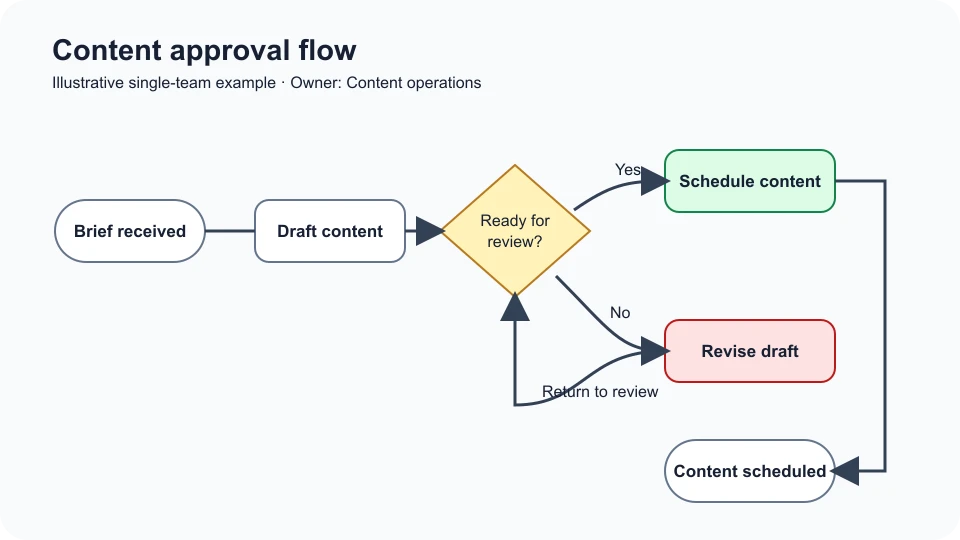
The rejected-draft branch returns to review instead of ending without an outcome.
Support escalation: cross-functional swimlane
Support classifies a request. Severity 1? sends ordinary requests to the standard queue and a severity-one incident record—with account, impact, reproduction details, and logs—to Engineering. Engineering investigates and returns status; Support owns customer communication.
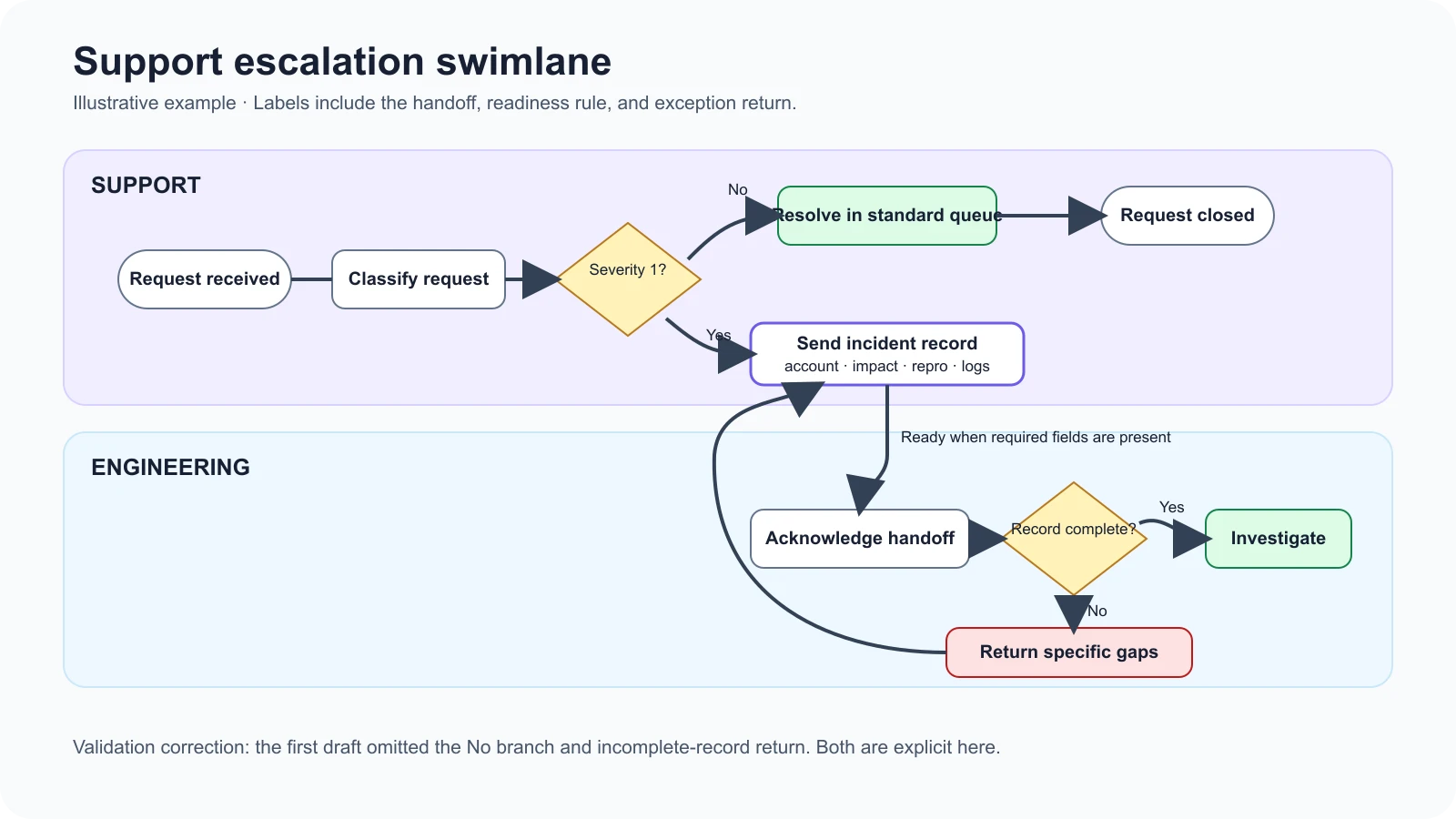
The walkthrough correction labeled the non-severity branch and returned incomplete incident records to Support instead of leaving a dead end.
Purchase request: high-level SIPOC
| Suppliers | Inputs | Process | Outputs | Customers |
|---|---|---|---|---|
| Requester, budget owner, approved vendor source | Business need, budget code, specifications, approval rule | Submit → Validate → Approve → Order → Record | Approved order, confirmation, recorded commitment | Requester, finance, receiving team |
The SIPOC clarifies the boundary and required inputs. It deliberately does not show task ownership or rejected-request logic; those belong in a follow-on swimlane or detailed map.
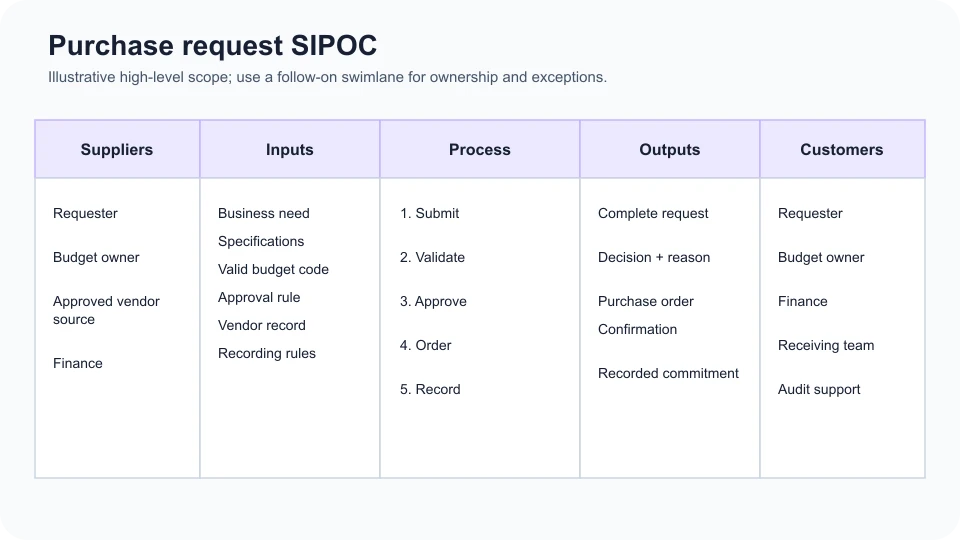
SIPOC defines the boundary; decision logic belongs in a follow-on process map.
Process map validation checklist
- The trigger is an observable event, and the end condition is an observable outcome.
- Every task uses a verb-led label and contains one action.
- Every decision is a question with all outcomes labeled.
- Normal, incomplete, rejected, unavailable, and escalation paths end or rejoin clearly.
- Every cross-role handoff names what moves, the readiness rule, and the next owner.
- The legend explains any symbol that is not obvious to the audience.
- The current state was checked by people who perform and receive the work.
- The map shows an owner, approval status, last reviewed date, and next review point.
- The supporting SOP, policy, form, or data source is linked where readers need detail.
- A future state is labeled as proposed until it has been tested and approved.
Process map template vs. workflow template vs. SOP
| Artifact | Primary output | Use it when | It does not automatically do |
|---|---|---|---|
| Process map template | Visual model of sequence, decisions, ownership, or flow | People need to understand, verify, or redesign work | Assign tasks, enforce rules, or execute approvals |
| Workflow template | Repeatable work structure in a task or automation system | People need to run and track instances | Explain every policy or field instruction |
| SOP | Written procedure, controls, and detailed instructions | A performer needs to complete work consistently | Give an immediate visual view of complex handoffs |
A static diagram communicates a point-in-time design. Living documentation adds ownership, links, dates, review triggers, and updates. An executable workflow creates instances and applies system behavior. One organization may connect all three, but calling a diagram a workflow does not make it executable.
How to build and maintain a process map in AFFiNE
In an August 10, 2026 desktop test, we placed a Page block with scope, owner, and review information beside three connected shapes on one Edgeless canvas. AFFiNE desktop 0.26.3 kept the neutral sequence Draft content → Review draft → Schedule content beside its notes.
Use AFFiNE's Edgeless whiteboard to arrange the visual steps, then keep the scope, assumptions, links, owner, and review metadata in a Page block beside the map. During the test, the first draft contained shapes but no connectors; adding directional arrows corrected the artifact from a collection of notes into a readable sequence.
This setup is documentation, not execution. The test did not validate collaboration, offline behavior, version audit, BPMN conformance, process mining, approval routing, SLA alerts, or automatic diagram-to-task conversion. Use specialized systems when those capabilities or regulated controls are required.
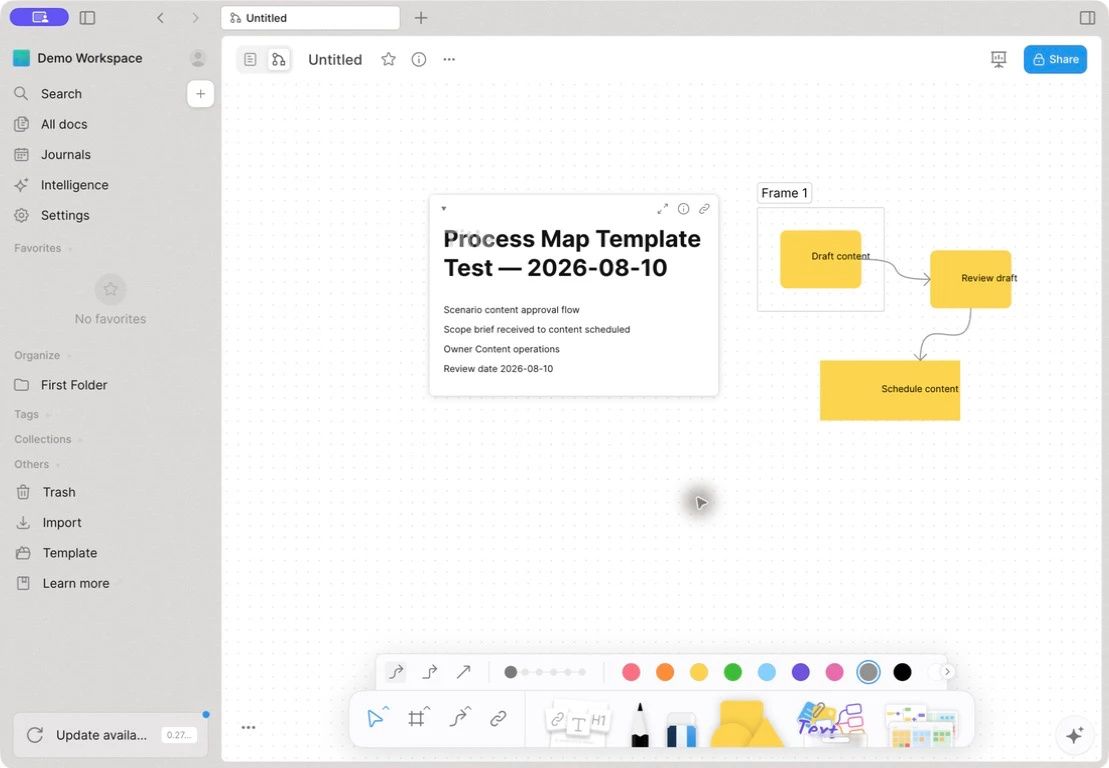
Dated product test on desktop build 0.26.3. The screenshot shows a documentation workflow, not an automated process.
Common process map template mistakes
- Mapping the ideal first. Validate current reality before drawing the future state.
- Leaving the boundary vague. Name the trigger, completed outcome, and out-of-scope work.
- Ignoring exceptions. Show incomplete inputs, rejection, unavailable owners, rework, and escalation.
- Using inconsistent symbols. Keep a small vocabulary and publish a legend for custom shapes.
- Overloading the map. Put screen clicks and field instructions in the SOP instead of shrinking the diagram text.
- Treating a handoff as an unlabeled arrow. Name the artifact, readiness rule, channel, and next owner.
- Using a VSM without data. Do not invent timing, demand, inventory, or queue values.
- Publishing without ownership. Add owner, status, last review, next review, and change triggers.
Frequently asked questions
What should a process map template include?
A process map template should include a defined trigger and end condition, verb-led tasks, decision questions with labeled outcomes, connectors, inputs or outputs, exceptions, and ownership where it matters. An approved map should also show its process owner, status, last reviewed date, next review point, legend, and links to supporting procedures or records.
Can I make a process map in Word or Excel?
Yes. Microsoft documents SmartArt process layouts for current versions of Word, Excel, and PowerPoint in its flowchart instructions. These tools work for a basic sequence or presentation. A dedicated canvas is usually easier when the map has many branches, cross-functional lanes, frequent revisions, or linked supporting notes.
What is the best process map type for cross-functional work?
Use a swimlane process map when the main question is who owns each action and what crosses team, role, customer, supplier, or system boundaries. Put every task in one accountable lane and label each handoff with the item transferred and its readiness rule. Use BPMN only when formal semantics are an explicit requirement.
Is a process map the same as a workflow?
Not necessarily. A process map is a visual model of how work should or does move. A workflow may be a repeatable operational structure, and an executable workflow applies system rules to real instances. A diagram can support a workflow, but it does not assign tasks, route approvals, enforce controls, or send alerts unless a connected system provides those functions.
When should I use SIPOC instead of a flowchart?
Use SIPOC when the team needs to agree on suppliers, inputs, five-to-seven major process stages, outputs, and customers before discussing detailed sequence. Use a flowchart when the order of tasks and decisions is the question. A useful pattern is to scope with SIPOC, then map the uncertain portion with a flowchart or swimlane.
How often should a process map be reviewed?
Set the cadence according to risk and change rate rather than using one universal interval. Review the map when a role, policy, system, input, output, control, or recurring exception changes. Display an owner, last reviewed date, next review point, and update trigger so readers can judge whether the diagram is still trustworthy.
Choose the lightest template that answers the question
A useful process map template makes the boundary, actions, decisions, handoffs, and evidence easier to challenge. Start with the selector, copy the lightest of the seven layouts that fits your question, and walk one normal case plus one exception through the draft. Then correct the map, name its owner, and set the next review point before treating it as working documentation.
For a visual workspace that can keep the map beside its scope, links, and maintenance notes, recreate the starter on an Edgeless canvas. Keep the claim modest: a connected map can explain work; it does not execute the process for you.